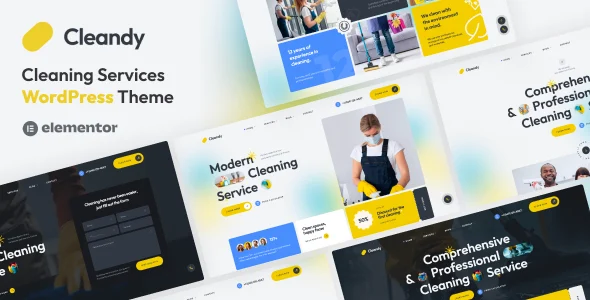
Cleandy – Cleaning Services WordPress Theme
Cleandy Cleaning Services WordPress Theme: an Elementor 4+ theme with 40+ widgets, price calculator, and demo import for cleaning business sites.
- Daily automated updates
- VirusTotal 0/70 clean
- Licensed under GPL
- Secure 256-bit checkout
- Instant direct cloud link
What Is Cleandy Cleaning Services WordPress Theme?
Cleandy Cleaning Services WordPress Theme is a WordPress theme built on the Underscores framework with Bootstrap 5 and Elementor 4+ integration, engineered for agencies and developers deploying websites for cleaning companies, maid services, and home care businesses. It resolves the bottleneck of assembling conversion-oriented service pages from scratch by shipping 15+ pre-built pages, 5 homepage layouts, and 40+ custom Elementor widgets specific to service workflows. Within production workflows, it functions as a self-contained source package: activate it, import demo content in one click, then restructure layouts through the drag-and-drop builder without touching PHP templates.
Key Features of the Theme
Execution flows through the WordPress template hierarchy: Elementor renders page sections as DOM trees from widget definitions, while the theme layer supplies color schemes, typography tokens, and header/footer builders that override native header.php and footer.php output.
Architectural Highlights
- Price Calculator Engine: A dedicated widget accepts flexible input fields and applies a custom total formula defined in the form builder, producing client-side cost estimates suitable for landing pages and single service layouts.
- Header & Footer Elementor Builder: Constructs unlimited header and footer layouts as Elementor templates, with dark and light UI modes, replacing fixed PHP partials and enabling per-page assignment.
- Service and Project Modules: Registers services listing and portfolio structures with multiple card layouts, carousel widgets, and single-service pages assembled from step cards, checklist widgets, galleries, and before/after comparison blocks.
- Theme Options Layer: An advanced options panel exposes unlimited color schemes, 1,000+ Google Fonts, preloader and popup controls, and blog configuration through ACF Pro, which ships bundled with the package.
- One Click Demo Import: Replicates the reference demo structure, including hero sections, pricing plans, and contact forms handled through MetForm, in a single administrative pass.
When a client engagement spans adjacent service verticals, pairing this package with Thermnova – Heat Pump, HVAC & Air Conditioning Services WordPress Theme keeps the same Elementor widget conventions across mechanical-service and cleaning-service builds, reducing per-project retraining time.
Who Should Use This Theme?
The codebase fits freelance developers and small agencies delivering client sites for residential cleaning, office cleaning, window washing, laundry, and move-in/move-out service firms under deadline constraints. It suits teams comfortable with Elementor’s rendering pipeline, child theme overrides, and the WPML or Polylang stack for multilingual rollouts. It is not intended for developers requiring Gutenberg-native block editing, since the package is not Gutenberg optimized, nor for projects that demand a fully headless decoupled front end, because the theme assumes standard server-rendered WordPress output. Teams maintaining portfolios across home services verticals — for example, accountancy practices via Execor – Accounting and Management Consulting WordPress Theme — can standardize on this builder-driven structure for consistent delivery.
Compatibility & Runtime Requirements
Deployment requires a standard WordPress host meeting the version floor below, with all listed browser targets supported at the front end.
| Engineering Metric | Deployment Specification |
|---|---|
| Base Technology / Framework | Underscores (_s) base, Bootstrap 5.x, CSS3 animations, PHP/CSS/JS files |
| Runtime / Language Requirements | WordPress 6.0.x through 7.1.x; Elementor v4+ |
| Data Exchange / Communication Protocols | HTTP form submission via MetForm; newsletter subscribe endpoints; interactive map embeds |
| Core Dependencies / Engine Compatibility | Elementor, ACF Pro (bundled), MetForm, WPML, Polylang, TranslatePress |
| Database / Storage Footprint | Standard wp_options and postmeta writes via ACF custom fields; demo content imported into native WP tables |
How to Install & Deploy the Theme
- Verify the server runs a supported WordPress core (6.0–7.1) and install/activate Elementor, since the widget layer depends on the builder runtime.
- Upload the theme archive through the Appearance upload screen or transfer the extracted files into wp-content/themes via FTP/SFTP.
- Click Activate; the theme options panel, custom widgets, header/footer builder hooks, and bundled ACF Pro dependency prompts become operational immediately.
- Run the One Click Demo Import to replicate the reference structure, then configure color schemes, typography, the calculator formula, and MetForm forms, and validate responsive output on the mobile breakpoints patched in v1.1.0.
Frequently Asked Questions
Are the demo photographs included in the download package?
No, the preview images sourced from Unsplash, Freepik, Pexels, and Pixabay are excluded from the package; developers must substitute their own licensed media before a client-facing launch.
Does the theme support child theme customization?
Yes, child theme support is built in, so template overrides and function-level changes can be isolated from the parent codebase and preserved across re-deployments of updated package versions.
Can the site be translated into multiple languages?
Yes, the codebase ships a .pot file and works with WPML, Polylang, or TranslatePress, allowing localized service pages, blog archives, and form labels on multilingual installations.