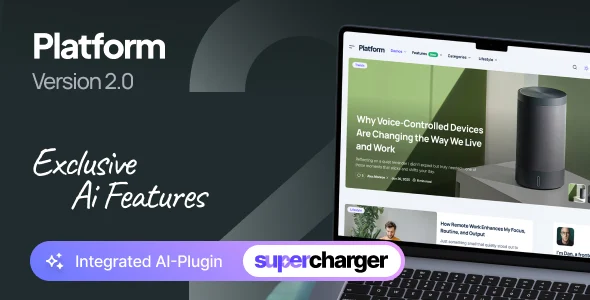
Platform – Modern High-Performance Blog WordPress Theme
Platform WordPress Theme is a Gutenberg-optimized blog and magazine solution for developers building fast, responsive editorial sites on WordPress 6.8+.
- Daily automated updates
- VirusTotal 0/70 clean
- Licensed under GPL
- Secure 256-bit checkout
- Instant direct cloud link
What Is Platform WordPress Theme?
Platform WordPress Theme is a PHP/CSS/JS source package for WordPress, engineered for developers and agencies to build blog, magazine, news, and portfolio sites without hand-coding template logic. It resolves the bottleneck of fragmenting editorial layouts across page builders by running natively inside the Block Editor, letting teams compose magazine grids, video posts, and viral news formats directly in Gutenberg. In production workflows, it acts as a self-hosted presentation layer that agencies deploy across editorial and personal blog client projects on WordPress 6.8.x through 7.1.x.
Key Features of the Theme
Execution flows through the native WordPress template hierarchy: PHP template files resolve the request, render Gutenberg block markup into a responsive DOM, and enqueue minified CSS and JS assets scoped to the active demo layout.
Architectural Highlights
- Gutenberg-first rendering: Block Editor optimization means content structures map directly to core block primitives, reducing wrapper-div nesting depth in the DOM tree and limiting CLS-inducing layout shifts between editor output and front-end render.
- Multi-demo magazine layouts: The package ships configurations for news, food, travel, AI, video, and creative portfolio verticals, each resolved through the same PHP template pipeline so switching demos alters layout logic without new plugin dependencies.
- Responsive 4+ column grid engine: Layout columns scale across breakpoints for Firefox, Safari, and Chrome, with high-resolution asset handling to keep editorial imagery sharp on dense-pixel displays.
- Widget-ready sidebar architecture: Widget zones register through standard WordPress widget APIs, letting teams inject dynamic sidebars and footer regions without touching theme files.
- External service endpoints: Social follower counts, share counts, and Instagram feed widgets communicate with third-party provider APIs, so teams should rate-limit and cache these responses to protect Core Web Vitals, particularly LCP when feeds render above the fold.
Who Should Use This Theme?
This codebase fits WordPress developers and small agencies building editorial products: newspaper sites, personal blogs, video-driven magazines, and creative portfolios where the Block Editor is the primary authoring surface. Teams running multilingual publications can pair it with WPML, and those needing form capture can wire Contact Form 7 endpoints into landing templates. For agencies diversifying into niche verticals, the same Gutenberg-driven approach appears in packages like Agrezen – Agriculture Organic Farm WordPress Theme, which targets farm and agribusiness builds on WordPress 6.x. This theme is not intended for non-technical operators who want a drag-and-drop page builder replacement; layout changes run through block composition and the Customizer rather than a proprietary visual canvas.
Compatibility & Runtime Requirements
Deployment requires a WordPress core install within a defined version window and standard PHP hosting, with no external framework prerequisites beyond the declared integrations.
| Engineering Metric | Deployment Specification |
|---|---|
| Base Technology / Framework | WordPress theme (PHP, CSS, JS files included) |
| Runtime / Language Requirements | PHP/MySQL stack per WordPress 6.8.x, 6.9.x, 7.0.x, 7.1.x |
| Data Exchange / Protocols | WP REST/API-driven widget data for social counts and feeds |
| Core Dependencies | Block Editor, Contact Form 7, WPML |
| Layout / Storage | Responsive layout, 4+ columns, widget zones, high-resolution assets |
How to Install & Deploy the Theme
- Environment pre-check: Confirm the server runs a supported WordPress version (6.8.x through 7.1.x), PHP meets core requirements, and the database is reachable. Verify the target browser matrix (Firefox, Safari, Chrome) for QA baselines.
- Package upload: Transfer the theme archive through the WordPress administration interface under Appearance, or place the extracted PHP/CSS/JS directory into wp-content/themes via SFTP.
- Direct activation: Click Activate. The template hierarchy, widget zones, Gutenberg block styles, and administrative theme options initialize immediately and the package becomes operational for production.
- Configuration & testing: Import or configure the target demo layout, then complete site-specific settings manually: social account links, widget assignments, and form endpoints. Validate rendered output and page speed, since performance scores depend on the selected demo, server configuration, and content payload.
Frequently Asked Questions
Are demo images included with the theme files?
No. Sample images shown in the preview are excluded from the package because they were sourced under Shutterstock, Creative Commons, or similar arrangements. You must supply your own licensed media for production deployments.
Does activating a demo guarantee identical front-end output to the live preview?
No. Demo content approximates the preview, but site-specific options such as social links and widgets require manual configuration. The promotional landing page shown first is also excluded from the theme files.
Do externally powered widgets always reflect real-time data?
No. Social follower counts, share counts, and Instagram feeds depend on third-party service providers whose availability and rate policies sit outside the theme’s control, so those modules can degrade independently of the local install.