Team Showcase – WordPress Plugin
Team Showcase WordPress Plugin builds responsive team, staff, and testimonial layouts with shortcodes, filters, drag-and-drop ordering, and JSON-LD data for developers.
- Daily automated updates
- VirusTotal 0/70 clean
- Licensed under GPL
- Secure 256-bit checkout
- Instant direct cloud link
What Is Team Showcase?
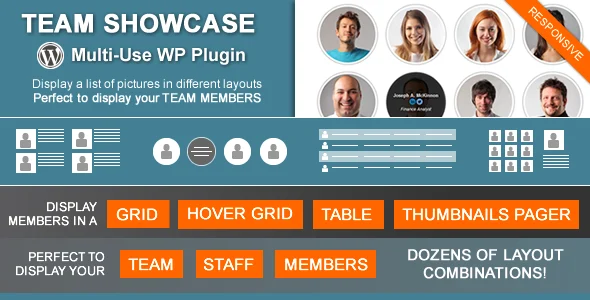
Team Showcase is a PHP/JavaScript WordPress plugin, engineered for developers and agencies to render team, staff, and member directories without hand-coding layout logic. It resolves the recurring bottleneck of presenting image-plus-text records in consistent, responsive structures by registering a dedicated custom post type with per-entry metadata fields. In production, it operates as a shortcode- and PHP-function-driven rendering layer that slots into client builds, staging environments, and widget areas.
Key Features of the Plugin
At runtime, the plugin registers a custom post type (renamable in settings), stores entry data as post meta, and renders it server-side through four layout engines dispatched via shortcode or a generated PHP template function. Client-side behavior — filtering, pagination, and the pager slider — is handled with jQuery and the bxSlider library, while FontAwesome vectors power the social icons.
Architectural Highlights
- Four layout engines: Grid, hover-reveal grid, table, and thumbnails-pager outputs share a common data source but diverge at the template layer; column count, image composition (above, left, or right of content), text alignment, and shape handling (squared, rounded, circular, grayscale, borders, shadows) are parameterized per instance.
- jQuery taxonomy filtering: Grid and hover layouts can attach an Isotope-based group filter, with filter identifiers supporting non-Latin characters and hierarchical child terms in dropdown mode. A shortcode parameter selects which taxonomy drives the live filter.
- Structured data output: Single entry pages can emit JSON-LD of type ‘Person’, inherited from the earlier People rich-snippet markup, allowing search engines to parse member entities for rich result eligibility.
- Query-level shortcode API: Parameters extend beyond display into WP_Query control — meta_key and orderby (including meta_value, meta_value_num, last-name ordering, and session-persisted random ordering), include/includetax sets, exclude IDs, a search parameter, meta_query comparisons such as meta_query=’_tsposition:Position:LIKE’, and site=” for multisite cross-blog fetching.
- Editorial workflow tools: Drag-and-drop re-ordering on the admin archive, front-end search with autocomplete, AJAX pagination plus a Load More mode, lightbox integration hooks, and up to four custom taxonomies for grouping by department or position.
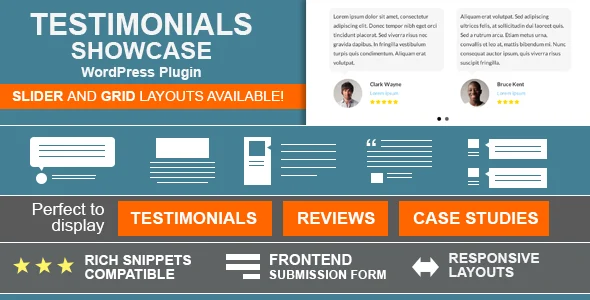
When a client deliverable needs adjacent social-proof content rather than staff records, pairing this codebase with Testimonials Showcase keeps both member grids and rating-driven testimonial sliders on one consistent rendering pattern.
Who Should Use This Plugin?
This package fits agencies building corporate, university, club, or community sites where staff directories, department rosters, or image-plus-text listings must be maintained by editors rather than developers. Because layouts are generated through a preview-capable shortcode builder and a PHP function for theme-file hardcoding, it suits both template-driven and developer-managed integrations, including WPML and Polylang multilingual stacks and Divi-based builds (an explicit compatibility fix exists). It is not aimed at block-first workflows: Gutenberg optimization is explicitly marked as not supported, though a block editor option for entries was added in version 2.2.4, and teams wanting native FSE-driven directory blocks should evaluate accordingly. Developers needing structured consulting-firm or financial-services presentation layers might instead combine it with Advia, whose Elementor widget set handles the surrounding business pages while this module owns the roster views.
Compatibility & Runtime Requirements
Baseline runtime constraints center on PHP and WordPress core versions, with a documented code path that spans nearly a decade of releases.
| Engineering Metric | Deployment Specification |
|---|---|
| Base Technology | WordPress plugin (PHP, JavaScript, HTML, CSS files included) |
| Runtime / Language | PHP 8 compatibility fixes shipped (versions 2.2.6 and 25.05.14); jQuery for client-side interaction |
| WordPress Core Support | WordPress 6.0.x through 6.8.x documented as supported versions |
| Browser Matrix | IE9–IE11, Firefox, Safari, Opera, Chrome, Edge |
| Data Storage | Custom post type plus post meta entries; up to four taxonomies; optional JSON-LD output on single pages |
How to Install & Deploy the Plugin
Deployment follows the standard WordPress administrative lifecycle, with no external registration steps required to make the feature set operational.
- Environment pre-check: Confirm the target server runs a PHP 8-compatible stack and a WordPress core version between 6.0.x and 6.8.x; verify jQuery-dependent theme scripts will not conflict with the filter or pager modules.
- Package upload: Upload the plugin archive through the administration interface, or transfer the extracted PHP/JS/CSS folders directly into the plugins directory via SFTP.
- Direct activation: Activate the plugin; the custom post type registers immediately, admin menus appear (with a dedicated icon since the 3.8-era update), and the shortcode generator becomes available for composing layouts with live previews.
- Configuration & testing: Open the settings panel to rename the feature slug, define default image sizes applied on upload, add custom entry fields, and choose single-page templates; then insert a generated shortcode or PHP function call into a page or text widget and validate grid rendering, filtering, and pagination behavior.
Frequently Asked Questions
Does the plugin support multisite networks?
Yes. A site=” shortcode parameter fetches entries from another blog on the network by blog ID, allowing a centralized roster to render across multiple subsites.
Can shortcodes be placed in widgets?
Yes. The generated shortcode executes inside text widgets, so any configured layout — grid, table, hover, or pager — can render in sidebar or footer widget areas.
Is the block editor supported for entries?
Partially. The package is not marked Gutenberg optimized, but a settings option added in version 2.2.4 enables the block editor for authoring individual entry content.
Does it output structured data for SEO?
Yes. Single entry pages can emit JSON-LD ‘Person’ structured data, which search engines read to evaluate eligibility for entity-based rich results.