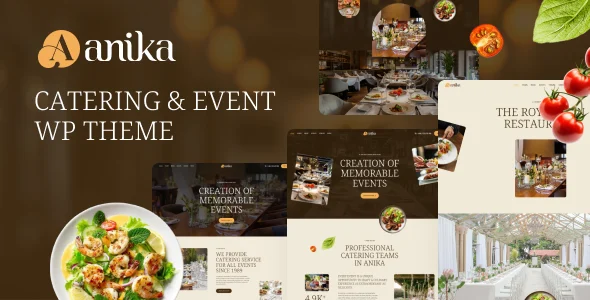
Anika – Catering Event WordPress Theme
Anika Catering Event WordPress Theme is an Elementor-based package for building catering, wedding, and event planner sites on WordPress 6.x with PHP 7.4+.
- Daily automated updates
- VirusTotal 0/70 clean
- Licensed under GPL
- Secure 256-bit checkout
- Instant direct cloud link
What Is Anika Catering Event WordPress Theme?
Anika Catering Event WordPress Theme is an Elementor-driven WordPress theme, engineered for agencies and freelance developers building presentation sites for caterers, wedding coordinators, and corporate event teams. It resolves the structural problem of displaying menus, service packages, and past event portfolios without fragmenting content across generic blog posts, by shipping dedicated Services and Events custom post types. In production workflows it functions as a rapid staging base: developers import the demo in one pass, replace imagery and copy through the Elementor editor, and hand off a structured site to non-technical content editors.
Key Features of the Theme
Execution flows through the WordPress template hierarchy: front-end requests resolve to theme template files that render Elementor-generated markup, while custom post types persist Services, Events, and Venue records in standard wp_posts storage queried per archive and single view. Because the package is not Gutenberg-optimized, all layout composition happens inside the Elementor canvas rather than the block editor.
Architectural Highlights
- Services and Events Custom Post Types: Dedicated content registers isolate service packages and event case studies from standard posts, giving each entity its own admin menu, archive template, and structured single-event detail page for predictable permalink and taxonomy behavior.
- Venue Content Layer: A separate Venues record set with detail templates lets developers bind physical locations to event entries, useful for banquet halls and multi-site catering operations.
- One-Click Demo Import: The importer provisions all pre-built pages — Home, Our Menu, Events, Event Details, Venues, Venue Details, About, Blog, and Contact — and auto-generates a child theme on import, so overrides happen outside the parent codebase.
- Contact Form 7 Integration: The contact page template wires native form shortcodes, letting inquiry requests route through the plugin’s own mail pipeline without additional glue code.
- Translation and RTL Readiness: String extraction plus right-to-left stylesheet handling support multilingual deployments for regional catering markets.
For schedule-driven sites that need calendar views beyond static event pages, pairing this package with Modern Events Calendar extends it with list, grid, and compact schedule layouts driven by a full booking-oriented event plugin.
Who Should Use This Theme?
This theme fits WordPress developers and small agencies delivering client sites for catering services, wedding planners, banquet venues, and food-service brands where visual polish matters more than custom backend logic. It suits projects where the client will edit copy and images themselves through Elementor’s drag-and-drop interface rather than touching PHP. It is not intended for engineering teams requiring headless WordPress decoupling, block-editor-first builds, or WooCommerce-native storefronts — the documentation lists no WooCommerce compatibility, and Gutenberg support is explicitly absent. Teams managing venues with paid admissions should evaluate a dedicated ticketing engine such as Chillout instead, since that architecture targets ticket-selling flows this package does not implement.
Compatibility & Runtime Requirements
Deployment requires a baseline LAMP stack meeting the documented WordPress and PHP floors, with Elementor installed as the primary rendering dependency.
| Engineering Metric | Deployment Specification |
|---|---|
| Base Technology / Framework | WordPress theme, Elementor page builder, Contact Form 7 |
| Runtime / Language Requirements | WordPress 6.x or newer; PHP 7.4 or higher |
| Verified Core Versions | Tested across WordPress 6.0.x through 6.9.x |
| Browser Support | IE11, Firefox, Safari, Opera, Chrome, Edge |
| Layout & Asset Attributes | Responsive layout, high-resolution assets, widget-ready, PHP/HTML/CSS/JS file set |
How to Install & Deploy the Theme
- Environment Pre-check: Confirm the server runs PHP 7.4 or higher and WordPress 6.x, and that the Elementor plugin is installed and active, since page composition depends on it.
- Package Upload: Upload the theme archive through Appearance → Add New → Upload Theme, or transfer the extracted PHP, CSS, and JS files directly into wp-content/themes via SFTP.
- Activation: Activate the theme from the administration panel; all template files, custom post type registrations, and widget areas become operational immediately.
- Configuration & Testing: Run the one-click demo import to provision the pre-built page set and auto-generated child theme, then rebind social links and widgets, replace demo imagery with licensed assets, and validate form submission and mobile rendering before launch.
Note that the promotional landing page shown in previews is not part of the installable package, and page speed results vary with server configuration and imported content volume.
Frequently Asked Questions
Does the theme include a child theme for code-level overrides?
Yes. A child theme is auto-generated during the demo import process, so template and function overrides can be applied in a separate directory without modifying the parent package files.
Can I rebuild or duplicate any imported page layout?
Yes. Every imported page is editable through Elementor, so developers can clone existing sections, adjust container structures, or assemble new layouts from the same widget set.
Is RTL or multilingual output supported out of the box?
Yes. The package ships translation-ready string handling and RTL stylesheet support, enabling right-to-left locales and multilingual plugins to render correctly after standard configuration.