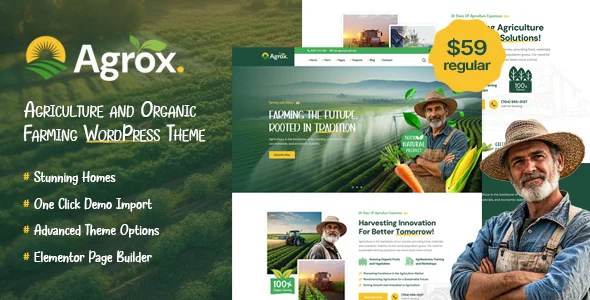
Agrox – Agriculture Organic Farming WordPress Theme
Agrox Agriculture Organic Farming WordPress Theme: an Elementor-driven PHP codebase for agencies building farm, dairy, livestock, and organic food sites on WordPress 6.x.
- Daily automated updates
- VirusTotal 0/70 clean
- Licensed under GPL
- Secure 256-bit checkout
- Instant direct cloud link
What Is Agrox Agriculture Organic Farming WordPress Theme?
Agrox Agriculture Organic Farming WordPress Theme is a PHP, CSS, and JS codebase engineered for developers and agencies building websites for organic farms, dairy operations, livestock producers, and sustainable agriculture businesses. It resolves the recurring bottleneck of assembling farm-specific layouts—crop showcases, product catalogs, and service pages—by shipping pre-built Elementor structures that render through WordPress’s template hierarchy without custom PHP authoring. In production, it functions as a deployable parent theme with child-theme override support, suited to both agency staging pipelines and single-owner farm sites.
Key Features of the Theme
The codebase executes through the WordPress template hierarchy: incoming requests resolve against theme PHP templates, which inject Elementor-rendered section markup into the DOM, while theme options persist color, header, footer, and blog-style configuration as serialized options consumed at render time. Version 1.0.8 ships two homepage layouts and has been tested against Elementor’s current release, WooCommerce 10.7, and WordPress 7.0.
Architectural Highlights
- Elementor Drag-and-Drop Rendering Layer: Page composition runs entirely through the Elementor builder, so layout edits write widget trees to postmeta rather than hard-coded template files, keeping the PHP layer stable across revisions.
- One-Click Demo Import Pipeline: A bundled installer writes demo posts, widget data, and theme options in a single pass, cutting staging setup to minutes—provided server limits meet import thresholds.
- Theme Options Control Surface: Administrative panels expose color palettes, header and footer variants, blog page styles, and page-header styles, with values applied globally through the options layer at render time.
- Child Theme Template Overrides: The package supports a child theme that safely overrides default template files, isolating custom PHP modifications from upstream updates.
- Commerce and Forms Stack: WooCommerce support covers versions 6.x through 10.7 for product and order handling, while Contact Form 7 and MC4WP: Mailchimp for WordPress provide form submission and mailing-list capture endpoints.
For structuring custom field data behind farm content—harvest schedules, certification records, product attributes—the theme’s ACF Pro integration handles the data layer, and pairing the build with Amerce Multipurpose eCommerce WordPress Theme gives agencies a reference Elementor/WooCommerce pattern for multi-vertical store flows.
Who Should Use This Theme?
The codebase targets WordPress developers and small agencies delivering client sites in the agricultural vertical: vegetable and fruit producers, dairy and livestock operations, eco-farm projects, and organic food retailers. It suits teams that prefer Elementor-driven composition over hand-coded block templates—Gutenberg optimization is explicitly not provided, so block-first workflows will need additional tooling. It is not intended for developers requiring a headless decoupled architecture or those unwilling to depend on Elementor as the rendering engine. Teams managing multi-project portfolios across adjacent industries can standardize on sibling stacks; for consulting and corporate engagements, Convera Business Consulting WordPress Theme follows the same Elementor/Bootstrap 5.x delivery model.
Compatibility & Runtime Requirements
Deployment requires a WordPress host meeting the baseline PHP and database floor, with server limits raised for demo import operations.
| Engineering Metric | Deployment Specification |
|---|---|
| Base Technology | WordPress theme (PHP, CSS, JS files) |
| Runtime Requirements | PHP 7.4 or greater; MySQL 5.7+ or MariaDB 10.3+ |
| WordPress Core Support | 6.0.x through 6.9.x; optimized for WordPress 7.0 |
| Builder & Commerce Engine | Elementor (latest tested), WooCommerce 6.x–10.7 |
| Plugin Dependencies | ACF Pro, Contact Form 7, MC4WP, WPML |
| Import Thresholds | max_execution_time 300; memory_limit 128M; post_max_size and upload_max_filesize 32M |
| Browser Matrix | Firefox, Safari, Opera, Chrome, Edge |
How to Install & Deploy the Theme
Deployment follows the standard WordPress theme installation workflow, gated by the PHP configuration limits listed above.
- Environment Pre-check: Verify PHP 7.4+, MySQL 5.7+/MariaDB 10.3+, and raise max_execution_time to 300 and memory_limit to 128M to prevent demo import truncation.
- Package Upload: Upload the theme archive through the WordPress administration interface under Appearance, or transfer the extracted PHP/CSS/JS files directly to wp-content/themes via SFTP.
- Direct Activation: Activate the theme from the Appearance screen; administrative menus, Elementor integration, and all core modules initialize immediately. Optionally install the bundled child theme for template-level overrides before proceeding.
- Configuration & Testing: Run the one-click demo importer, then adjust colors, fonts, headers, and footers through the theme options panel; validate the responsive layout across the supported browser matrix and confirm WooCommerce product flows render correctly.
Frequently Asked Questions
Are demo images included in the download package?
No. Demo images are used only for demonstration on the preview site and are excluded from the package, so developers must supply licensed photography for live farm, crop, and product sections.
Does the theme support multilingual farm sites out of the box?
Yes. The codebase ships .POT translation files and is WPML compatible, enabling translated page trees and localized product catalogs once the WPML plugin is installed and configured.
Is the theme block-editor (Gutenberg) based?
No. Gutenberg optimization is not provided; page composition runs through Elementor’s drag-and-drop rendering layer, and block-editor workflows will not drive the shipped layout structures.