Duplicator Pro Plugin
Trash Duplicate and 301 Redirect Plugin is a WordPress plugin that detects duplicate posts, trashes them, and maps removed URLs to canonical 301 redirects for SEO-safe content teams.
- Daily automated updates
- VirusTotal 0/70 clean
- Licensed under GPL
- Secure 256-bit checkout
- Instant direct cloud link
What Is Trash Duplicate and 301 Redirect Plugin?
Trash Duplicate and 301 Redirect Plugin is a PHP-based WordPress Plugin, engineered for agencies and editorial teams that need to eliminate duplicate posts, pages, and custom post type entries without losing inbound link equity. It resolves the canonical fragmentation problem that occurs when multiple authors or user-submitted workflows publish near-identical content, which splits crawler signals across repeated URLs. In production, it operates as a two-stage module: a duplicate detection layer that enumerates matching records per post type, and a redirect persistence layer that maps each trashed permalink to the retained canonical URL.
Key Features of the Plugin
The engine executes at the WordPress data layer: duplicate candidates are queried against the posts table scoped by post type, matched records are moved to trash status rather than hard-deleted, and on each trash event the plugin writes a redirect rule binding the retired slug to the retained post URL. When a request for a retired URL arrives, the redirect controller evaluates its rule set and dispatches an HTTP status header before template rendering, terminating the request early to avoid unnecessary query overhead.
Architectural Highlights
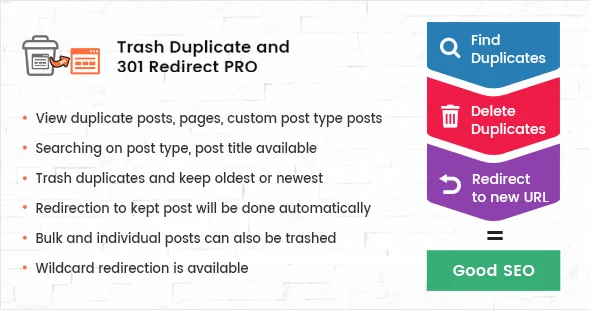
- Post-Type-Scoped Duplicate Enumeration: The detection routine groups records by registered post type, so administrators can audit duplicates for pages, posts, or custom post types independently rather than scanning the entire content store in one pass.
- Retention Policy Selection: Trash operations accept a keep-newest or keep-oldest directive, letting the module deterministically choose the canonical survivor while trashing the remainder of the match group.
- Automatic Redirect Binding: Each trashed post receives a redirect entry pointing to the kept post’s permalink automatically, removing the manual mapping step that typical cleanup workflows require.
- Multi-Code Redirect Control: Redirection rules support HTTP status codes 301, 302, 303, 304, 307, and 308, with distinct behavior configurable for logged-in versus logged-out sessions, enabling staging-safe preview flows.
- Wildcard and Manual Rule Management: Beyond automatic entries, administrators can add, delete, or define wildcard redirect patterns and trash individual posts on demand; the auto-delete option (introduced in version 1.2) allows duplicates to be purged without per-item review.
Teams that extend content models alongside this cleanup workflow often pair it with Code Snippets Pro Plugin to register additional custom post types that the duplicate scanner can then scope against.
Who Should Use This Plugin?
This codebase fits WordPress engineers maintaining multi-author publications, community sites with user-submitted content, and Easy Digital Downloads storefronts where product records are cloned by content teams. Agency developers running staging-to-production content migrations benefit from the automatic redirect binding, since retired staging URLs preserve inbound traffic. It is not intended for non-technical operators seeking a visual page builder, nor for headless WordPress setups where redirect logic is delegated to an external edge layer or reverse proxy. Sites already standardizing on Nginx map files or CDN-level redirect tables may prefer to keep canonicalization at the infrastructure tier instead of the application tier.
Compatibility & Runtime Requirements
The package targets self-hosted WordPress installations across a broad core version range, shipping as standard PHP with supporting JavaScript, HTML, CSS, and XML assets.
| Engineering Metric | Deployment Specification |
|---|---|
| Base Technology / Framework | WordPress plugin (PHP server-side, JS/HTML/CSS/XML assets included) |
| Runtime / Language Requirements | PHP-capable WordPress hosting stack |
| Core Engine Compatibility | WordPress 4.9.x through 6.5.x; current release 1.5 verified against WordPress 6.5.5 |
| Third-Party Integrations | Compatible with Easy Digital Downloads; Gutenberg-optimized admin screens |
| Protocol & Output Layer | HTTP redirect header dispatch (301, 302, 303, 304, 307, 308) |
| Rendering Assets | High-resolution admin UI, RTL-compatible administration interface |
How to Install & Deploy the Plugin
Deployment follows the standard WordPress administrative workflow with no external configuration gate.
- Environment Pre-check: Confirm the host runs a WordPress version within the 4.9.x–6.5.x supported range and that the PHP runtime meets baseline WordPress server requirements.
- Package Upload: Transfer the plugin archive through the administration plugins installer, or extract the folder into the site’s wp-content/plugins directory via SFTP.
- Direct Activation: Activate the plugin from the plugins list; all detection screens, redirect management panels, and administrative menus become operational immediately upon activation.
- Configuration & Testing: Open the settings panel, select the post types to scan, choose a keep-newest or keep-oldest retention policy, configure redirect status codes and logged-in versus logged-out behavior, then trigger a duplicate scan and verify a retired URL resolves to its canonical target with the expected HTTP status header.
For directory-style builds where slug churn across listing pages is common, combining this cleanup workflow with Directory Pro Plugin gives developers a coordinated post-type and redirect strategy across large listing archives.
Frequently Asked Questions
Does trashing a duplicate hard-delete the post from the database?
No. Duplicate records are moved to WordPress trash status, so administrators retain a restore path before permanent removal; the redirect entry to the kept post is generated as part of the trash operation.
Can different redirect codes be applied depending on user session state?
Yes. Since version 1.2, the plugin supports separate redirection options for logged-in and logged-out users, letting developers suppress redirects for authenticated editors while enforcing them for public traffic.
Does the scanner cover custom post types or only posts and pages?
Yes. Duplicate enumeration runs per registered post type, and post-type-wise searching lets administrators isolate scans to pages, posts, or any registered custom post type independently.
Is the administrative interface usable on right-to-left language sites?
Yes. Version 1.2 introduced RTL compatibility, and the current 1.5 release maintains it alongside high-resolution admin assets and Gutenberg-optimized screens for localized editorial teams.