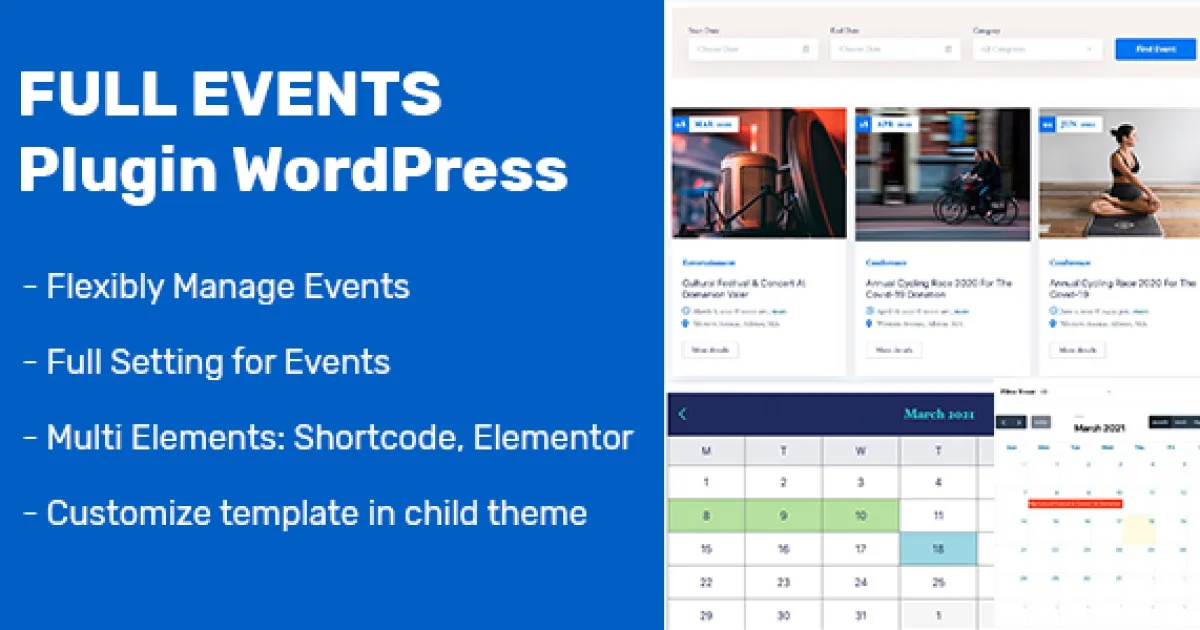
FullEvents Plugin
FullEvents Manage Event WordPress Plugin delivers Elementor Ajax event filtering and structured event layouts for developers building schedule-driven WordPress sites.
- Daily automated updates
- VirusTotal 0/70 clean
- Licensed under GPL
- Secure 256-bit checkout
- Instant direct cloud link
What Is FullEvents Manage Event WordPress Plugin?
FullEvents Manage Event WordPress Plugin is a PHP-based WordPress plugin, engineered for agencies and solo developers to publish, organize, and filter event listings inside Elementor-built pages. It resolves the recurring bottleneck of full-page reloads during date or venue filtering by dispatching queries through an Ajax pipeline instead of re-rendering the whole document. In production, it functions as a self-contained event data layer that pairs with the bundled Layout 1 presentation template to output schedulable, venue-tagged listings across multi-year event calendars.
Key Features of the Plugin
The engine registers event records as structured data entities, each carrying a title, timestamp, and location string, then exposes them to an Elementor widget that intercepts filter interactions via XMLHttpRequest rather than standard navigation. This keeps DOM state intact between requests and limits server work to query execution and markup fragment generation.
Architectural Highlights
- Elementor Event Filter Ajax: Filter actions trigger an asynchronous request that returns only the updated listing fragment, eliminating full page reloads and preserving scroll position during category, date, or venue narrowing.
- Layout 1 Rendering Module: A predefined card layout maps each event record to a repeatable markup pattern, standardizing how titles, schedules, and venues are visually serialized across the archive.
- Multi-Year Event Spanning: The data model accepts entries dated from past cycles (December 2021) to far-future sessions (November 2030), demonstrating that the query layer does not impose a hard chronological window on stored records.
- Venue and Time Metadata: Each listing binds a datetime value with optional start/end ranges and a venue string, enabling combined temporal and spatial filtering without custom post meta plumbing from the developer.
When a build also needs to gate specific event detail pages behind membership tiers, wrapping the template output with Restrict Content Pro Plugin lets developers apply role or password conditions on the same Elementor canvas the plugin renders into.
Who Should Use This Plugin?
This codebase targets WordPress engineers assembling conference portals, dance or music event calendars, and tourism congress sites where a client edits event records through the admin UI and the front end must filter without page reloads. It fits agency staging workflows that already standardize on Elementor as the layout engine. It is not intended for developers building headless or fully decoupled front ends, since the widget outputs depend on the Elementor rendering context, nor for non-technical operators expecting a standalone calendar application outside the WordPress admin.
Compatibility & Runtime Requirements
Baseline runtime constraints follow the standard WordPress plugin execution model with an active Elementor environment required for the filter widget to register.
| Engineering Metric | Deployment Specification |
|---|---|
| Base Technology | PHP-based WordPress plugin |
| Runtime Baseline | Standard WordPress Core Environment (PHP execution) |
| Parent Ecosystem Dependency | Elementor page builder (required for the Event Filter Ajax widget) |
| Data Formats | Ajax request/response cycles returning HTML fragments; WordPress post meta storage for event records |
| Supported Event Horizon | Chronologically open-ended records, verified from 2021 through 2030 entries |
To enrich venue detail sections with live location reputation data, pairing the calendar with Google Places Reviews Pro Plugin supplies API-driven review widgets that render alongside event venue strings.
Customization & Workflow Integration
Integration follows the standard Elementor addon contract: after activation, the Event Filter Ajax widget appears in the editor panel and can be dropped into any section, column, or template built with the Elementor editor. Developers override presentation by extending the Layout 1 card structure through child-theme template overrides or targeted CSS scoped to the widget wrapper, avoiding edits to plugin core files that complicate redeployment. Because filtering runs through asynchronous requests, custom hooks placed around the query layer can post-process the event collection before markup serialization, enabling site-specific ordering rules or venue normalization. For multi-project agency toolkits, the plugin operates as an isolated module with no observable coupling to other listing engines, so it can coexist with directory or marketplace solutions such as Vehica on separate client builds without namespace conflicts.
Frequently Asked Questions
Does the Ajax filter require a full page reload when a visitor selects a new date range?
No. Filter interactions are dispatched asynchronously, and only the listing markup fragment is returned and swapped into the container, so the page state and scroll position remain preserved.
Can the plugin store events with both start and end times?
Yes. Documented records such as the Freestyle Dance Events listing show ranges (9:00 AM to 1:00 PM), indicating the data model supports interval-based scheduling alongside single-time entries.
Will the event widget work without Elementor installed?
No. The Elementor Event Filter Ajax module registers as an Elementor widget, so the builder must be active in the environment for the filtering interface to appear and function.
Are events limited to a specific year range in the query layer?
No. Verified sample entries span December 2021 through November 2030, confirming the record schema accepts chronologically distant dates without a fixed forward horizon.