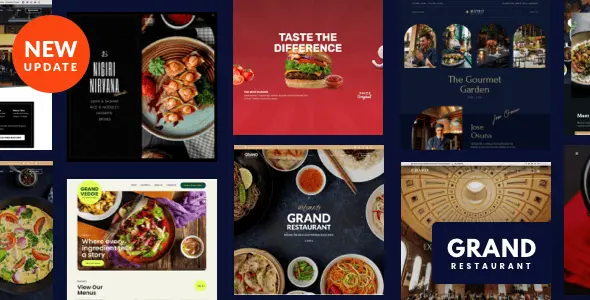
Grand Restaurant WordPress
Grand Restaurant WordPress Theme delivers WooCommerce food ordering, one-click demo import, and Elementor support for cafe and bistro sites.
- Daily automated updates
- VirusTotal 0/70 clean
- Licensed under GPL
- Secure 256-bit checkout
- Instant direct cloud link
What Is Grand Restaurant WordPress Theme?
Grand Restaurant WordPress Theme is a PHP, CSS, and JavaScript theme package engineered for agencies and freelance developers building websites for cafes, bistros, bars, and food-related businesses. It removes the architectural bottleneck of assembling food menu presentation, reservation flows, and delivery commerce from disconnected plugins by shipping those modules inside one template hierarchy with one-click demo import. In production, it operates as the presentation layer over a standard WordPress install, exposing configuration through the Live Customizer and a built-in content builder that runs in Live and Classic modes.
Key Features of the Theme
Rendering flows through the WordPress template hierarchy, compiling Customizer values into inline CSS per request. State changes made in the Customizer preview panel apply to the live DOM without a page rebuild, and the responsive toggle lets developers validate laptop, tablet, and mobile viewports from the same backend session. The codebase ships as PHP, CSS, and JS files with widget-ready regions and a 4+ column responsive grid.
Architectural Highlights
- WooCommerce Commerce Layer: Menu items bind to WooCommerce 6.x through 9.x, supporting both online and offline payment paths, plus a per-menu-item direct purchase link field that routes customers straight to an order action instead of a cart funnel.
- Reservation Dispatch Module: Booking requests resolve through three selectable channels — an email form, a custom URL redirect, or an OpenTable handoff — so no custom booking backend has to be written or maintained.
- Google Maps Styling Engine: Map color schemes load from Snazzy Maps style definitions, and multiple maps and locations render on the same install, which matters for multi-branch restaurant clients.
- Built-In Content Builder: A drag-and-drop module system (gallery, blog, testimonials, and others) renders page layouts without touching theme code, displays screenshot-based module selection, previews responsive output inline, and saves any page as a reusable template.
- Template Inventory: Three food menu layouts with three menu styles, four contact templates, and six blog templates covering photo, gallery, video (YouTube, Vimeo, self-hosted), and SoundCloud post formats.
Navigation is handled by a dedicated menu subsystem: Classic, left-align, or right-align layouts, a sticky menu toggle, mega menu column support, a top bar for contact address, open hours, and phone number, a desktop side menu, and a live search module that returns partial-query feedback from the header or side menu.
Who Should Use This Theme?
The package fits development teams delivering hospitality client builds — restaurants, bakeries, pizzerias, pubs, and chef portfolio sites — where reservation capture, menu presentation, and WooCommerce ordering must coexist in one install. It also suits multilingual deployments, since WPML is an explicitly supported dependency. Agencies whose portfolio mixes hospitality with travel booking can standardize the same WordPress runtime across projects by pairing this package with Tripper, which covers booking-engine-heavy engagements. This architecture is not intended for developers who require a Gutenberg-first editing workflow — the package is not marked Gutenberg optimized — or for headless, decoupled frontends that bypass PHP template rendering entirely.
Compatibility & Runtime Requirements
Baseline runtime constraints are defined by the WordPress core version in use, with optional integrations activating only when their parent plugins are present.
| Engineering Metric | Deployment Specification |
|---|---|
| Base Technology / Framework | WordPress theme package (PHP Files, CSS Files, JS Files); responsive layout, 4+ columns, widget ready, high resolution assets |
| Runtime / Language Requirements | WordPress 4.9.x through 7.0.x on a standard PHP/MySQL hosting stack |
| Data Exchange / Communication Protocols | Google Maps rendering with Snazzy Maps styling; OpenTable reservation handoff; Facebook integration; email-form booking |
| Core Dependencies / Engine Compatibility | WooCommerce 6.x–9.x, Elementor, Elementor Pro, WPML, bbPress 2.5.x; browsers IE11, Firefox, Safari, Opera, Chrome, Edge |
| Database / Storage Footprint | Standard WordPress tables (options and post meta) for Customizer, theme options, and widget settings; no custom schema declared in the documentation |
How to Install & Deploy the Theme
Deployment follows the standard WordPress theme lifecycle, and every feature becomes operational immediately after activation.
- Environment Pre-check: Confirm the host runs a WordPress version between 4.9.x and 7.0.x, and install the required parent plugins — WooCommerce, Elementor, or WPML — if the project scope calls for them.
- Package Upload: Transfer the theme archive through the administration interface under Appearance, or upload the extracted PHP, CSS, and JS file tree directly to the themes directory via SFTP.
- Direct Activation: Click Activate in the themes list. All core modules, administrative menus, content builder modules, and Customizer panels initialize at this point with no additional registration steps.
- Configuration & Testing: Open the Live Customizer to set layout type (boxed or wide), typography from the included 500+ Google Fonts, color pickers, and background parameters; run the one-click demo importer for one of the six predefined demos, then validate menu, reservation, and checkout flows against the responsive preview.
Frequently Asked Questions
Does the demo importer cover all six predefined demos, including their settings?
Yes. The one-click importer pulls pages, posts, sliders, widgets, theme options, and other settings for each of the six predefined demos, including the Modern Cuisine, Asian Food, and Elegant Food stylings, so a staged build starts from a complete reference configuration.
Can food ordering run without an online payment gateway?
Yes. WooCommerce 6.x through 9.x handles online and offline payment paths, and each menu item accepts a direct purchase link. Teams extending the same runtime into retail verticals often deploy Ferrano alongside hospitality builds for fashion catalogs.
Is this package built for the Gutenberg block editor?
No. The package is not marked Gutenberg optimized; page composition runs through its built-in drag-and-drop content builder in Live or Classic mode, with Elementor and Elementor Pro supported as an alternative editor for teams standardizing on that stack.