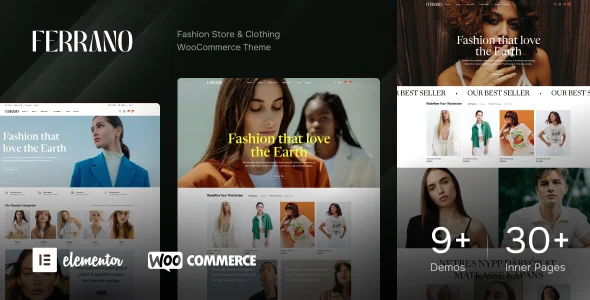
Ferrano – Fashion Store WooCommerce Theme
Ferrano is an AJAX WooCommerce WordPress theme for fashion stores, built on Elementor and Bootstrap 5 with multi-vendor and WPML support.
- Daily automated updates
- VirusTotal 0/70 clean
- Licensed under GPL
- Secure 256-bit checkout
- Instant direct cloud link
What Is Ferrano – Fashion Store WooCommerce Theme?
Ferrano – Fashion Store WooCommerce Theme is a PHP-based WordPress theme built on a Bootstrap 5.x foundation with Elementor and Elementor Pro integration, engineered for agencies and store developers to assemble fashion, lifestyle, decor, and multi-brand eCommerce sites without writing template code. It resolves the bottleneck of full-page reloads in WooCommerce catalogs by routing shop filtering, search, pagination, and cart mutations through asynchronous AJAX request cycles. In production, it operates as the presentation layer over WooCommerce 5.x through 10.x, deployable through a setup wizard and prebuilt demo layouts.
Key Features of the Theme
The engine renders catalog, product, and cart surfaces through asynchronous endpoints, so filtering, sorting, and cart state changes never trigger a full document reload.
Architectural Highlights
- Full AJAX shop pipeline: Search filters, the sort bar, grid/list switching, AJAX pagination, load-more controls, and infinite scroll all update the product loop client-side, reducing server round-trips per browsing session and limiting layout shift during catalog swaps.
- Product Box Builder and variation swatches: Catalog cards are assembled from configurable modules — custom badges, stock progress bars, unit prices, sale countdowns, quickview, wishlist, and compare actions — while variation attributes render as selectable swatches instead of dropdown fields.
- Multi-vendor readiness: The template hierarchy accounts for Dokan and WC Marketplace vendor surfaces alongside core WooCommerce loops, so marketplace operators can expose seller views without hand-overriding archive templates.
- Header, footer, and mega menu customizers: Layout, typography, and color tokens are managed through the WordPress Customizer, with sticky header states, drawer and mobile menus, announcement bars, and campaign/newsletter popups configured declaratively rather than in markup.
- Internationalization layer: Translation-ready strings ship with WPML, Polylang, and Loco Translate support, plus RTL and LTR direction handling and multi-currency presentation.
Catalog population itself stays within WooCommerce; for stores sourcing inventory externally, a pipeline such as Amazon Affiliates WooCommerce writes Amazon product data into the same product tables this architecture renders.
Who Should Use This Theme?
The codebase targets WooCommerce development teams and agencies producing client storefronts in apparel, jewelry, footwear, watches, sportswear, and baby products, as well as operators running multi-vendor marketplaces through Dokan or WC Marketplace. Catalog mode with hidden prices, custom checkout fields, and bundle products extends it into quotation-based B2B flows. It is not intended for headless or decoupled builds — rendering is coupled to PHP template execution — nor for developers who prefer maintaining a fully hand-coded theme. Teams whose client scope extends beyond a single vertical can compare Milano, a multipurpose WooCommerce theme carrying 90+ built-in sales features, a header/footer builder, and 35+ Elementor widgets.
Compatibility & Runtime Requirements
Baseline runtime constraints follow the WordPress, WooCommerce, and browser versions declared in the package metadata.
| Engineering Metric | Deployment Specification |
|---|---|
| Base Technology / Framework | WordPress theme shipped as PHP, CSS, and JS files; Bootstrap 5.x foundation; Elementor and Elementor Pro integration |
| Runtime / Platform | WordPress 5.2.x through 7.1.x; WooCommerce 5.x through 10.x; standard PHP/MySQL stack managed by the host; browsers from IE11 through Firefox, Safari, Opera, Chrome, and Edge |
| Data Exchange / Protocols | AJAX request cycles for shop filtering, search, cart notices, login/register flows, pagination, and order tracking; responsive layout with retina and high-resolution assets; SVG upload support |
| Core Dependencies / Compatibility | Gutenberg; WPML; Contact Form 7 and WPForms; bbPress 2.5.x/2.6.x; BuddyPress 9.x/10.x; Events Calendar and Events Calendar Pro; widget-ready sidebars |
| Database / Storage Footprint | Configuration persists through WordPress Customizer options and widget areas; product, order, and vendor records remain in the WooCommerce core tables with no proprietary schema |
How to Install & Deploy the Theme
- Environment pre-check: Confirm the server runs a supported WordPress version (5.2.x–7.1.x) with WooCommerce active, and verify that Elementor availability matches the demo layout you intend to import. Confirm the PHP/MySQL stack meets current WordPress minimums.
- Package upload: Transfer the theme archive through the administration interface under Appearance → Add New → Upload, or unpack the PHP, CSS, and JS files directly into wp-content/themes via SFTP.
- Activation: Activate the theme from the Appearance screen. Administrative menus, customizer panels, widget areas, and WooCommerce template overrides initialize immediately; a child theme ships in the package, so code-level customization should target it to preserve parent files across future updates.
- Configuration & testing: Run the visual setup wizard, import a prebuilt demo, then configure the header and footer builders, mega menus, catalog mode, currency, and free-shipping bar messaging. Validate AJAX filter responses, quickview, side cart, sticky add-to-cart, and custom checkout field output before go-live. When a client project later expands beyond fashion into general merchandise, the same deployment workflow applies to sibling builds such as Unimart, whose Elementor widget set targets multipurpose catalogs.
Frequently Asked Questions
Does the package include a child theme for safe customization?
Yes. A child theme ships inside the package, so PHP and CSS modifications belong in the child directory. This keeps parent files intact when the codebase is updated, and the online documentation covers the recommended override workflow.
Can pages be composed without Elementor installed?
Yes. The package is Gutenberg optimized, so standard pages and posts can be composed with native blocks. Elementor and Elementor Pro power the custom product blocks, listing grids, tabs, and carousels declared in the feature set.
Does the theme handle right-to-left languages?
Yes. RTL and LTR direction support is declared in the feature set, and the theme is translation ready with WPML, Polylang, and Loco Translate compatibility. Multi-currency presentation and localized account pages operate within the same WooCommerce configuration.