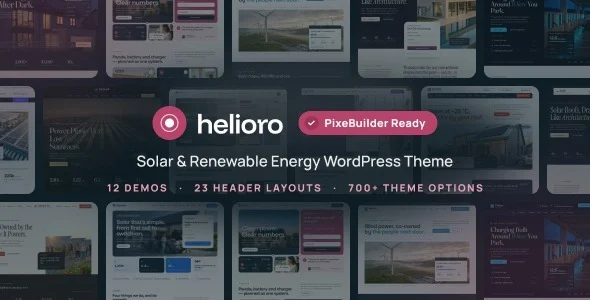
Helioro – Solar Energy, Battery Storage & EV Charging WordPress Theme
Helioro WordPress Theme delivers 12 PixeBuilder demos, case-study spec sheets, and WooCommerce support for solar, battery and EV charging firms.
- Daily automated updates
- VirusTotal 0/70 clean
- Licensed under GPL
- Secure 256-bit checkout
- Instant direct cloud link
What Is Helioro?
Helioro is a WordPress theme, engineered for agencies and in-house web teams delivering sites for solar installers, battery storage operators, EV charging networks, heat-pump firms, and wind developers to deploy sector-specific marketing platforms on WordPress 6.8.x through 7.1.x. It resolves the recurring bottleneck of hand-coding energy project proof — system size, annual yield, CO2 avoided, and payback figures — by embedding structured case-study spec sheets directly into the portfolio template layer. In production workflows, it operates as a PixeBuilder-based starter system: twelve importable demos cover residential, commercial and industrial, utility-scale, nonprofit, consultancy, and WooCommerce commerce scenarios.
Key Features of the Theme
Rendering flows through PixeBuilder section trees that output into the standard WordPress template hierarchy, with the PHP templates, stylesheets, and scripts shipped inside the package rather than pulled from external services.
Architectural Highlights
- PixeBuilder page engine: every demo page is constructed in PixeBuilder, the free builder distributed on WordPress.org, keeping layout definitions inside standard WordPress storage and avoiding dependency on commercial builder plugins.
- Palette token pipeline: setting accent, ink, ground, and line colors once propagates through cards, tables, forms, chips, and menus; an automatic contrast routine flips text between white and ink whenever it sits on the accent color, cutting manual accessibility fixes.
- Structured case-study fields: system size, panel count, annual yield, CO2 avoided, payback, location, and completion date persist per project across 16 portfolio layouts, so specification data stays attached to each project page instead of dissolving into freeform copy.
- Navigation and header architecture: 23 header layouts, a sticky and transparent header mode, a sub-menu drop-down panel with icon tiles and descriptions, a slide-in mobile panel with numbered items and a call-to-action, plus one-page anchor navigation that highlights the active section during scroll.
- Demo importer with multi-threaded image fetch: a single operation installs pages, menus, widgets, and theme options together, with parallelized image downloads shortening staging spin-up across all 12 demos. Contact Form 7 additionally receives dedicated styling presets — quote forms, one-row newsletter blocks, and light, dark, or accent variants.
Who Should Use This Theme?
This package fits agencies and freelance developers building client sites in the renewable energy vertical — residential installers needing quote funnels, commercial developers presenting utility-scale farm projects, and equipment sellers running the Solar Store demo on WooCommerce 10.x. Multilingual deployments route through full WPML support, while content operations can attach unlimited sidebars per page or post. Teams standardized on Elementor rather than PixeBuilder should weigh an alternative base such as Archidex, whose Bootstrap 5.x and GSAP-driven codebase serves architecture and interior clients. The asset is not intended for editors who want block-editor-native authoring: it is marked Gutenberg Optimized: No, so layout work happens inside PixeBuilder, not the core block editor.
Compatibility & Runtime Requirements
Baseline deployment requires a WordPress host matching the version matrix below; the shipped file set consists of PHP, CSS, and JS assets with no documented external build step.
| Engineering Metric | Deployment Specification |
|---|---|
| Base Technology / Framework | WordPress theme built on PixeBuilder; PHP Files, CSS Files, JS Files included |
| Runtime Requirements | WordPress 6.8.x, 6.9.x, 7.0.x, and 7.1.x |
| Browser Matrix | Firefox, Safari, Opera, Chrome, Edge |
| Core Dependencies | Contact Form 7, WooCommerce 10.x.x, WPML, The Events Calendar compatible |
| Storage / Data Footprint | Standard WordPress persistence; responsive, widget-ready output at 4+ column densities with high-resolution assets |
How to Install & Deploy the Theme
Deployment follows the standard WordPress administration path; activation is a direct administrative action that immediately enables every module.
- Environment pre-check: confirm the server runs a supported WordPress version (6.8.x–7.1.x) and that Contact Form 7 plus WooCommerce are installed when the target demo requires quote forms or the Solar Store catalog.
- Package upload: transfer the theme archive through the appearance administration screen, or upload the extracted PHP, CSS, and JS file set directly to the themes directory.
- Activation: activate the package; the admin panel exposing 700+ theme options and the importer modules initialize on the spot. Run the demo importer for the chosen vertical — pages, menus, widgets, and theme options install in one pass while images download across multiple threads.
- Configuration & testing: set the four Palette tokens, select header and footer layouts, assign sidebars, then validate form submissions, WooCommerce checkout, and mobile menu behavior before go-live. Teams juggling parallel client verticals — an energy build alongside a finance project on Finkash — can reuse this identical import-configure-verify sequence.
Frequently Asked Questions
Do the demo images ship inside the package?
Yes. Every image used across the 12 demos is AI-generated specifically for this codebase and may be reused in your own project, so no separate stock photography sourcing pass is required before staging a client site.
Can specific pages bypass the footer or copyright bar?
Yes. Nine footer layouts ship with the theme, and both the footer and the copyright area can be disabled on any individual page, which suits landing pages and one-page installer builds that end on a call-to-action.
Is there a maintenance or holding mode?
Yes. A maintenance and coming-soon mode switches the entire front end from the admin panel in one action, letting teams run demo imports or palette changes while visitors see a holding screen instead of live content.