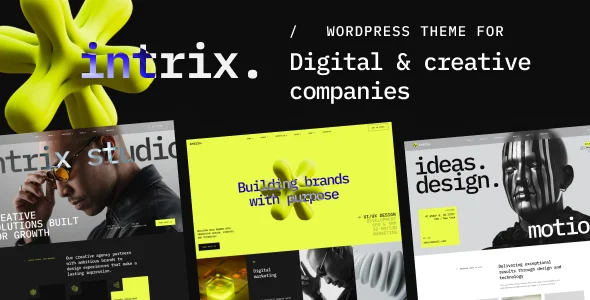
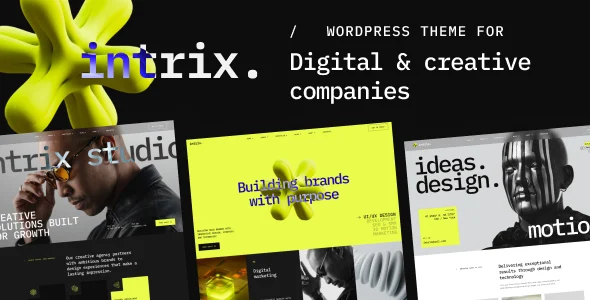
Intrix – Digital Creative Agency WordPress Theme
Intrix is a WordPress theme for creative agencies, built on the WGL Framework with Elementor header builder, WooCommerce 10.x support, and 50+ modules.
- Daily automated updates
- VirusTotal 0/70 clean
- Licensed under GPL
- Secure 256-bit checkout
- Instant direct cloud link
What Is Intrix Digital Creative Agency WordPress Theme?
Intrix Digital Creative Agency WordPress Theme is a WordPress theme engineered for creative studios, branding agencies, and freelance developers to assemble agency, portfolio, and showcase websites without hand-coding layout logic. It resolves the bottleneck of fragmented header and portfolio tooling by consolidating a drag-and-drop header builder, a mega menu system, and more than 50 configurable modules into a single WGL Framework codebase. In production, it functions as a deployable parent theme with an included child theme, letting teams scaffold client sites via one-click demo import and then extend behavior in the child layer.
Key Features of the Theme
The theme parses Elementor widget settings on the server, resolves per-page metabox values against global theme options, and renders the final DOM through the WordPress template hierarchy. Header output is generated by the WGL Header Builder rather than static PHP templates, so layout changes propagate without touching source files.
Architectural Highlights
- WGL Framework with Header Builder: A drag-and-drop header engine ships with presets, decoupling header composition from template files so per-page overrides render through the builder’s own output chain.
- Over 100 theme options plus metaboxes: Global colors and fonts are stored as theme options, while per-page local options are written through metaboxes; at render time, local values take precedence, enabling scoped design variations without duplicating settings.
- Portfolio module architecture: Portfolio grids support infinite scroll and a Load More button, dispatching asynchronous requests to append grid items and controlling DOM node injection for pagination state.
- WooCommerce 10.x integration: An extended module presents products inside page layouts, so shop templates inherit the same module settings and styling pipeline as standard content sections.
- Extended WGL row animations: Row-level animation classes are emitted as section attributes and triggered on scroll, keeping animation definitions attached to the Elementor row data rather than external scripts.
For studios that need a comparable Elementor-driven build with animation-heavy agency layouts, the Adon theme follows a similar builder-first architecture with GSAP-based motion.
Who Should Use This Theme?
The codebase suits agency engineering teams maintaining multiple client builds, freelancers delivering branding and marketing sites, and design studios that need portfolio grids, team member modules, and shop pages from one dependency chain. Because the package bundles PHP, CSS, and JS files with documentation, it fits staging-to-production workflows where developers customize templates in the child theme. It is not intended for operators who want a block-first editing experience: the theme is not Gutenberg optimized, and sites requiring native block-theme templating or headless decoupled frontends should evaluate alternatives. Teams running pure blog or editorial properties without Elementor will also add unnecessary module overhead.
Compatibility & Runtime Requirements
Baseline deployment targets WordPress 7.0.x with Elementor active as the page rendering engine.
| Engineering Metric | Deployment Specification |
|---|---|
| Base Technology | WordPress theme (PHP, CSS, JS files included), WGL Framework |
| Runtime Requirements | WordPress 7.0.x; Elementor plugin for page building |
| Commerce Compatibility | WooCommerce 10.x.x for product and shop templates |
| Browser Support | Firefox, Safari, Opera, Chrome, Edge |
| Layout & Output | Responsive layout, 4+ column grids, high-resolution assets, widget-ready sidebars |
| Localization | Translation ready via WPML and Polylang |
How to Install & Deploy the Theme
- Environment pre-check: Confirm the server runs WordPress 7.0.x, install and activate Elementor, and verify WooCommerce 10.x if commerce templates will be used.
- Package upload: Upload the theme archive through the Appearance upload screen or transfer the extracted PHP, CSS, and JS files into the wp-content/themes directory.
- Direct activation: Activate the theme from the administration panel; all WGL modules, the header builder, mega menu tool, and theme options panel become fully operational, and the bundled child theme can be activated for custom development.
- Configuration & testing: Run the one-click demo import to scaffold reference layouts, adjust the 100+ theme options and per-page metaboxes, then validate responsive output across the supported browsers and exercise portfolio infinite scroll and shop pages.
Agencies staging multi-vertical catalogs alongside this package often standardize on domain-specific builds; for a medical commerce deployment sharing the same Elementor and WPML toolchain, teams pair it with Xmedcar. Marketing-focused agencies needing SEO-oriented structures can instead evaluate Marrky.
Frequently Asked Questions
Does the theme depend on the Gutenberg editor for its layouts?
No. The package is not Gutenberg optimized; page composition runs through Elementor widgets and the WGL Header Builder, while core content areas remain standard WordPress templates rendered through the template hierarchy.
Is a child theme included for custom PHP modifications?
Yes. A child theme ships inside the package, so developers can override templates and enqueue custom CSS or JS without editing parent files, preserving parent updates as a separate concern.
Can the demo content be replicated on a staging server first?
Yes. The one-click demo content import works in any WordPress 7.0.x environment, letting teams clone the reference layouts locally, modify module settings, and then promote the configured build to production.