Bridge – Creative Elementor and WooCommerce WordPress Theme
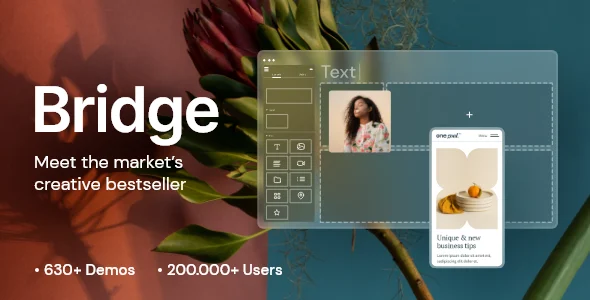
Bridge is a multipurpose WordPress theme with 630+ demos, Elementor and WPBakery support, WooCommerce integration, and bundled slider plugins.
- Daily automated updates
- VirusTotal 0/70 clean
- Licensed under GPL
- Secure 256-bit checkout
- Instant direct cloud link
What Is Bridge – Creative Elementor and WooCommerce WordPress Theme?
Bridge – Creative Elementor and WooCommerce WordPress Theme is a PHP/CSS/JS multipurpose Theme package engineered for developers and agencies that need to ship varied client sites from a single codebase. It resolves the maintenance burden of maintaining one theme per niche by consolidating 630+ importable demos, 24 layout concepts, and dedicated post types for listings, news, and restaurant menus into one template hierarchy. In production workflows, it operates as the parent presentation layer over WordPress core, while layout construction is delegated to Elementor, WPBakery, or the Block Editor.
Key Features of the Theme
At runtime, this architecture renders each request through WordPress template hierarchy overrides, merging global and per-page option values before header, title-area, and footer partials assemble the final DOM tree. Asset delivery relies on the packaged PHP, CSS, and JS file set, with AJAX page transitions (four animation types, individually assignable or globally disableable) layered over classic full-page loads.
Architectural Highlights
- Triple-Builder Rendering Layer: WPBakery Page Builder ships bundled alongside the package, while Elementor projects extend through Qi Addons (60+ free widgets, 100+ with the premium tier) and Gutenberg projects through Qi Blocks (48 custom blocks). Shortcode-based modules — counters, pie charts, progress bars, graph charts — compile server-side into the page output.
- Header and Mega Menu State Engine: Ten header types support top or side positioning, fixed shrink-on-scroll behavior, and sticky activation at a configurable scroll threshold (defaulting to slider height when a slider is present). Separate logo versions attach to initial, sticky, dark-skin, light-skin, mobile, and fullscreen-menu states, and wide mega menu columns accept widget slots plus anchor links for one-page navigation.
- Commerce Layer: WooCommerce support (versions 7.x through 10.x) exposes shop styling through the admin interface, with YITH Quick View and YITH Wishlist compatibility plus the QODE Wishlist module for shareable product lists.
- Vertical Extension Plugins: Dedicated plugins register a Listing post type with directory shortcodes, News/magazine post layouts, a Restaurant module (menus, working hours, OpenTable connection), and a Membership module for front-end account creation and social-profile login.
- Portfolio and Blog Architecture: Seven portfolio single layouts and seven list layouts with configurable column counts and hover animations, masonry and vertical-loop blog layouts, and post format support for Standard, Gallery, Link, Quote, Video, and Audio.
Where a storefront brief demands a larger built-in commerce feature set than a multipurpose base provides, architects frequently benchmark Milano — a WooCommerce theme carrying 90+ sales features and a header/footer builder — against this package before committing to a stack.
Who Should Use This Theme?
This codebase suits agency teams managing heterogeneous client rosters (corporate, creative, hospitality, retail, fitness), freelancers who need one reusable foundation across projects, and site owners in the listed verticals — restaurants, hotels, gyms, photography studios — who import a matching demo and restyle through the options panel. Teams requiring heavier Elementor-driven storefront tooling may pair it with Unimart for its 60+ commerce widgets, while affiliate operators importing Amazon catalog data through the Creators API can layer Amazon Affiliates WooCommerce on top of the shop layer. Conversely, it is not built for developers running headless/decoupled WordPress, nor for projects demanding a minimal single-purpose theme with the smallest possible asset footprint — 630+ demos imply meaningful option-tree and shortcode overhead.
Compatibility & Runtime Requirements
Deployment constraints center on WordPress core version alignment and the builder engine chosen per project.
| Engineering Metric | Deployment Specification |
|---|---|
| Base Technology / Framework | WordPress theme (PHP Files, CSS Files, JS Files); responsive layout, retina/HiDPI assets, 4+ column grids |
| Runtime Requirements | WordPress 5.3.x through 7.1.x |
| Builder Engine Compatibility | Elementor, WPBakery Page Builder (bundled), Block Editor / Gutenberg optimized |
| Core Dependencies | WooCommerce 7.x–10.x, Contact Form 7, Events Calendar, WPML, YITH Quick View/Wishlist, QODE Wishlist |
| Browser Targets | IE10, IE11, Firefox, Safari, Opera, Chrome, Edge |
How to Install & Deploy the Theme
- Environment Pre-check: Confirm the host runs a WordPress version within the 5.3.x–7.1.x range and decide the builder stack (Elementor, WPBakery, or Gutenberg) since demo imports instantiate shortcodes for the corresponding engine.
- Package Upload: Transfer the archive through the WordPress administration interface under Appearance → Themes, or upload the extracted PHP/CSS/JS files to wp-content/themes via FTP.
- Direct Activation: Click Activate; the options panel, bundled plugin install prompts, demo import interface, and custom post type registrations become operational immediately.
- Configuration & Testing: Install required bundled plugins, import the chosen demo, then configure header types, logo variants, typography, and footer columns (1–4 columns, with or without unfold behavior) before validating front-end output across target browsers.
Version 30.9.1 updates propagate through the Envato Toolkit’s one-click mechanism, removing manual FTP patching from the maintenance cycle.
Frequently Asked Questions
Do bundled plugins install automatically with the theme?
No. WPBakery, LayerSlider, Slider Revolution, and the Timetable plugin ship bundled but install individually through the dashboard prompt after activation. Their lifecycle follows Envato’s standard bundled-plugin model, so component versioning can trail the theme release.
Can demos be validated on a staging host before going live?
Yes. Each of the 630+ demos imports as a self-contained content set, so teams can verify layout fidelity and plugin dependencies on staging infrastructure before promoting configuration and media to the production database.
Does the package support multilingual output?
Yes. WPML compatibility is declared in the specification matrix, and front-end membership demos expose a testable user dashboard, allowing teams to verify translated menus, widgets, and login states before production rollout.