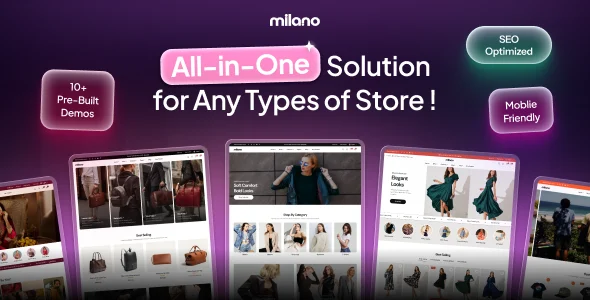
Milano – Multipurpose WooCommerce WordPress Theme
Milano is a multipurpose WooCommerce WordPress theme with 90+ built-in sales features, header/footer builder, and 35+ Elementor widgets.
- Daily automated updates
- VirusTotal 0/70 clean
- Licensed under GPL
- Secure 256-bit checkout
- Instant direct cloud link
What Is Milano – Multipurpose WooCommerce WordPress Theme?
Milano is a multipurpose WooCommerce WordPress theme engineered for agencies and store developers to launch conversion-focused eCommerce storefronts on a single codebase. It resolves a common architectural bottleneck: most multipurpose themes ship layout scaffolding only and delegate urgency timers, swatches, and cart-drawer logic to paid add-on plugins. In production, the package acts as the presentation and commerce layer of a standard WordPress and WooCommerce stack, replacing 25+ premium plugins with 90+ built-in features and tools.
Key Features of the Theme
Runtime requests render through WordPress template hierarchy overrides, while native WooCommerce hooks inject commerce modules directly into shop, product, cart, and checkout templates. A companion plugin, Milano Addons, isolates feature modules so individual toggles never interfere with core template logic or the Customizer.
Architectural Highlights
- Drag-and-drop header and footer builder: Rows and columns are composed visually for desktop and mobile without editing PHP templates. Draggable components include the logo with tablet and mobile alternates, primary and secondary menus, search bar, cart icon bound to the slide-out drawer, wishlist, account login dropdown, currency switcher, WPML language switcher, contact info, social links, and custom HTML blocks.
- AJAX discovery layer: Live search with trending and suggested keywords, faceted product filters (sidebar or modal position), Quick View modals, Quick Add to Cart, recently viewed sliders, and load-more/infinite scroll with URL updates all execute without full page reloads, keeping the DOM tree stable between interactions.
- Conversion and FOMO toolkit: Checkout countdown banners, sale countdown timers on product pages and shop cards, live visitor counters, sold-count proof, toast sale notifications, free-shipping progress bar, Buy Now checkout skip, sticky add-to-cart, and trust badge rows dispatch from theme modules rather than external scripts.
- Variation swatches engine: Color, image, and label swatches render on product cards and product pages. A variation compare modal filters variation images by a primary attribute such as Color, and linked variations expose each variant as its own linked catalog product.
- Rich media pipeline: Gallery layouts span slider, stacked, grid, and masonry modes, with PhotoSwipe and Drift.js powering hover zoom and the full-screen lightbox. Self-hosted, YouTube, or Vimeo video, a 360° frame-sequence viewer, and a GLB-based 3D/AR viewer mount inside the product gallery.
Content building runs on 35+ custom Elementor widgets (product carousels, lookbook, shoppable video, banners, countdown and sale blocks, testimonials, brands marquee, FAQ accordion, Mapbox map, copy-coupon button) plus a Theme Builder and Popup Builder that operate without an Elementor Pro subscription for the core template system.
Who Should Use This Theme?
The codebase targets WooCommerce development teams, freelance engineers, and agencies running multi-niche client stores — the demo library covers fashion and apparel, furniture, cosmetics, sports, jewelry, and electronics with one-click import of pages, sample products, customizer settings, headers, footers, and widgets. It also suits catalog-mode showcase deployments where prices and purchasing are disabled. Teams comparing alternative Elementor-driven storefront engines for an agency multi-project toolkit can benchmark against Unimart – Multipurpose WooCommerce Theme, which ships its own 60+ widget set and Redux options layer. This asset is not intended for headless or decoupled architectures requiring a REST-first frontend, nor for developers seeking a static HTML deliverable — it is a PHP/WordPress runtime package.
Compatibility & Runtime Requirements
Baseline constraints center on CMS and commerce engine versions rather than isolated server daemons, since the theme follows WordPress coding standards and uses only native hooks and APIs.
| Engineering Metric | Deployment Specification |
|---|---|
| Base Technology | WordPress theme package: PHP templates, Sass/SCSS and CSS stylesheets, JS assets, layered PNG sources |
| CMS Compatibility | WordPress 5.6.x through 7.0.x; version 1.10.0 is WordPress 7.1.x ready |
| Commerce Engine | WooCommerce 11.1.x ready; Gutenberg optimized |
| Page Builder Layer | 35+ custom Elementor widgets (free Elementor required); core template system functional without Elementor Pro |
| Browser Matrix | Firefox, Safari, Opera, Chrome, Edge |
| Localization | RTL layout with automatic right-to-left rendering, WPML language switcher, multi-currency switcher with automatic exchange rates |
| Output Attributes | Responsive layout, widget-ready, high-resolution, well documented |
How to Install & Deploy the Theme
- Environment pre-check: Confirm the server meets the PHP and MySQL requirements of the target WordPress release, deploy WordPress 5.6 or newer, activate WooCommerce, and install the free Elementor plugin if the widget suite will be used.
- Package upload: Upload the theme archive via the administration interface under Appearance → Add New Theme → Upload Theme, or transfer the extracted directory to wp-content/themes over SFTP.
- Direct activation: Click Activate; all administrative menus, modules, and Customizer sections become operational immediately. A first-run setup wizard offers a curated set of recommended free plugins, and one-click demo import populates the store with pre-built pages, products, and layout configurations.
- Configuration & testing: Set colors, typography, spacing, and preset schemes (Default, Dark, Green) in the Customizer; toggle Milano Addons modules from the theme dashboard; then validate AJAX search, swatches, and the cart drawer on the staging URL before release.
Frequently Asked Questions
Does the Theme Builder require an Elementor Pro subscription?
No. The core template system operates without Elementor Pro. The 35+ custom Elementor widgets and the Popup Builder do require the free Elementor plugin, while header, footer, and storefront templates render through the theme’s own builder.
Can feature modules be enabled and disabled independently?
Yes. Modules in the Milano Addons companion plugin toggle individually from the theme dashboard. Each module is self-contained, so activating Catalog Mode, Buy Now, or the 360° viewer leaves every other module’s state untouched.
Does the theme handle right-to-left languages without custom stylesheets?
Yes. Multilingual and RTL support is built in, and the layout flips automatically for right-to-left locales. A WPML-compatible language switcher ships as a draggable header-builder component, so no manual stylesheet duplication is required.