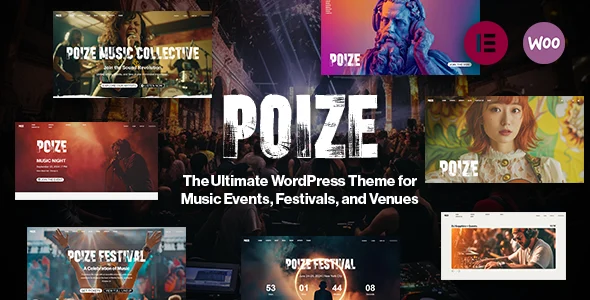
Poize – WordPress Theme for Music Events, Festivals Venues
Poize WordPress Theme for music events, festivals and venues: Elementor widgets, artist profiles, WooCommerce ticketing and one-click demo import for agencies.
- Daily automated updates
- VirusTotal 0/70 clean
- Licensed under GPL
- Secure 256-bit checkout
- Instant direct cloud link
What Is Poize WordPress Theme?
Poize WordPress Theme is a PHP, CSS, and JS package for WordPress 7.0.x, engineered for agencies and independent developers building online presences for festivals, concerts, and music venues. It resolves the recurring bottleneck of assembling event listings, artist bios, and ticketing flows from disconnected plugins by packaging event management, artist profile structures, and commerce hooks into a single codebase. In production workflows it functions as the presentation and data layer for an event-driven site, with the Elementor page builder handling layout composition on top of the theme’s widget set.
Key Features of the Theme
At runtime, the package resolves requests through the WordPress template hierarchy, dispatches Elementor widget renderers to output event and artist markup, and hands transactional state to WooCommerce. Demo data, page templates, and bundled assets hydrate the environment in a single import operation, so a staging instance can reach a demo-equivalent state before any custom configuration begins.
Architectural Highlights
- Elementor Widget Layer: Purpose-built widgets render schedules, artist grids, and event blocks through Elementor’s DOM output pipeline, eliminating hand-written template edits for layout changes.
- Dynamic Event Data Structures: Event records carry flexible layout options and scheduling metadata, letting developers switch between live music layouts and schedule displays per page without duplicating content types.
- Artist Profile Post Types: Bio text, social links, and media attach to a single profile record, so taxonomy queries and archive templates pull all artist data from one source instead of scattered page fragments.
- WooCommerce 10.x Commerce Bridge: The theme registers compatibility with WooCommerce 10.x.x, allowing tickets and merchandise to run through native store taxonomies, cart handling, and checkout templates.
- One-Click Demo Hydration: An import routine writes demo posts, images, and Elementor templates into the database in one pass, cutting initial staging setup to minutes. When deeper calendar logic is required, pairing the build with Modern Events Calendar extends scheduling with recurring events and multi-view date archives.
Who Should Use This Theme?
This codebase targets WordPress developers and small agencies delivering client sites for concert promotion, festival marketing, and venue management. It fits teams that already standardize on Elementor for layout work and want event, artist, and commerce modules pre-wired rather than assembled from scratch. Because Elementor templates ship inside the package, client-facing edits stay inside the builder instead of PHP files. It is not intended for block-editor-first builds: Gutenberg optimization is explicitly absent, so teams committed to native block themes or headless WordPress decoupled frontends should evaluate alternatives. Sites requiring Contact Form 7 forms are supported; those relying on other form systems will need their own integration work.
Compatibility & Runtime Requirements
Deployment requires a WordPress 7.0.x environment with Elementor active, and commerce features require WooCommerce 10.x.x installed alongside the theme.
| Engineering Metric | Deployment Specification |
|---|---|
| Base Technology / Framework | WordPress 7.0.x theme (PHP, CSS, JS files included) |
| Page Builder Engine | Elementor (widgets and templates bundled; Gutenberg not optimized) |
| Commerce Dependencies | WooCommerce 10.x.x for tickets and merchandise |
| Form Handling | Contact Form 7 compatibility |
| Browser Targets | Firefox, Safari, Opera, Chrome, Edge |
| Layout & Media | Responsive, high-resolution assets, 4+ column layouts, widget-ready sidebars |
For ticket sales beyond merchandise, the WooCommerce bridge pairs naturally with FooEvents for WooCommerce, which adds check-in and booking workflows on top of the same store taxonomies.
How to Install & Deploy the Theme
Deployment follows the standard WordPress theme workflow, with Elementor and WooCommerce installed before activation so bundled widgets and commerce templates initialize against their target engines.
- Environment Pre-check: Verify the host runs WordPress 7.0.x with PHP per the author’s documented server requirements, and confirm Elementor is installed and active.
- Package Upload: Upload the theme archive through the administration interface under Appearance, or transfer the extracted PHP, CSS, and JS files into wp-content/themes on the server.
- Direct Activation: Click Activate; the theme’s administrative menus, widget areas, and event/artist modules become operational immediately, and required plugin notices guide any remaining installs.
- Configuration & Testing: Run the one-click demo import to hydrate posts, images, and Elementor templates, then adjust the visual customizer settings, validate Contact Form 7 endpoints, and test a WooCommerce transaction end to end.
Frequently Asked Questions
Does Poize include the Slider Revolution plugin in the package?
Yes, the distribution bundles Slider Revolution, removing a separate acquisition step for slider-driven hero sections. All demo images ship inside the package, so imported pages render with the original visuals before any media replacement.
Can the theme be used without writing any PHP code?
Yes, event layouts, schedules, and artist profiles are edited through Elementor widgets and theme settings rather than template files. Developers still touch PHP when overriding the template hierarchy or extending the WooCommerce checkout for custom ticketing logic.
Is the one-page demo structure supported for venue landing pages?
Yes, the package ships a one-page demo layout suited to single-venue landing pages, with schedule display and artist showcase sections composed as Elementor sections. Multi-page festival sites can reuse the same widgets across dedicated event archive templates.