Zank – Shoes Fashion Store WooCommerce
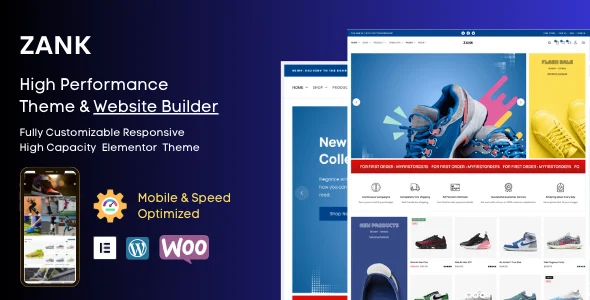
Zank Shoes Fashion Store WooCommerce Theme is an Elementor-based WordPress theme for footwear retailers building AJAX-driven, multivendor-ready storefronts.
- Daily automated updates
- VirusTotal 0/70 clean
- Licensed under GPL
- Secure 256-bit checkout
- Instant direct cloud link
What Is Zank Shoes Fashion Store WooCommerce?
Zank Shoes Fashion Store WooCommerce is an Elementor-driven WordPress theme, engineered for agencies and independent developers to build footwear and apparel storefronts on the WooCommerce commerce layer. It resolves the common bottleneck of rigid hardcoded shop templates by exposing every storefront region through a drag-and-drop builder, so catalog layouts no longer require PHP edits to restructure. In production, it operates as the presentation and commerce layer of a standard WordPress stack, handling template rendering, cart interactions, and shop page composition while delegating data persistence to WooCommerce core.
Key Features of the Theme
Execution follows the native WordPress template hierarchy: incoming requests resolve through WooCommerce template overrides, Elementor widgets render header, footer, and archive regions from stored layout data, and interactive commerce actions are dispatched as AJAX requests to avoid full-page reloads during add-to-cart and filtering events.
Architectural Highlights
- Elementor Theme Builder integration: Header, footer, product archives, single product pages, and cart/checkout regions are composed as reusable Elementor templates, decoupling layout structure from template PHP files and letting teams redesign storefront regions without touching the theme’s core files.
- AJAX commerce layer: Add-to-cart, cart updates, and product filtering dispatch asynchronous requests, keeping the DOM state intact during shopping actions and reducing full page reflows on catalog-heavy footwear listings.
- WooCommerce and multivendor compatibility: The codebase is built against WooCommerce’s hook and filter surface and accommodates multivendor marketplace plugins, allowing agencies to extend a single-brand store into vendor-partitioned catalogs without rewriting template logic.
- Prebuilt demo catalog: One-click demo import provisions the reference shoe-store layout — hero sections, category grids, and product detail templates — giving developers a concrete DOM baseline to modify rather than a blank starter shell.
- RTL and translation readiness: Right-to-left stylesheet handling and translation-file scaffolding let the same layout render for Arabic, Hebrew, and multilingual deployments via WPML or Polylang.
When a client project requires a comparable visual baseline for a different vertical — for example apparel or accessories — deploying Ferrano provides an equivalent Elementor and Bootstrap 5 commerce theme, keeping agency tooling consistent across fashion accounts.
Who Should Use This Theme?
This package targets professional WordPress developers, agency teams, and freelance engineers who already operate Elementor and WooCommerce in their delivery pipelines and need to ship branded footwear storefronts on short timelines. It fits client builds where merchandising teams must reorganize catalog layouts frequently, since Theme Builder templates absorb those changes without code diffs. Teams running multivendor marketplaces or multilingual retail networks can build on the same template surface. It is not intended for site owners who expect zero configuration: effective use requires familiarity with Elementor’s container system, WooCommerce product data structures, and standard WordPress hosting administration. Developers preferring to author raw PHP template overrides over builder-driven layouts will find the abstraction layer adds indirection they may not need.
Compatibility & Runtime Requirements
Deployment assumes a standard LAMP-based WordPress hosting environment meeting WooCommerce’s own server baseline.
| Engineering Metric | Deployment Specification |
|---|---|
| Base Technology / Framework | WordPress theme built on Elementor page builder and WooCommerce commerce core |
| Runtime / Language Requirements | PHP runtime per current WooCommerce minimums (PHP 7.4+ recommended), MySQL/MariaDB database |
| Data Exchange / Communication Protocols | HTTPS, AJAX request handling for cart and filter interactions |
| Core Dependencies / Engine Compatibility | Elementor (free or Pro), WooCommerce plugin, multivendor plugins, WPML/Polylang for multilingual builds |
| Database / Storage Footprint | Standard WordPress and WooCommerce table set; demo content and media assets require typical shared-hosting disk allocation |
How to Install & Deploy the Theme
Deployment is a four-stage workflow that moves the package from a verified host environment into a production-ready storefront.
- Environment pre-check: Confirm the host runs a current PHP version, an up-to-date WordPress installation, and that the Elementor and WooCommerce plugins are installed and activated, since the theme’s template widgets depend on both engines being present.
- Package upload: Transfer the theme archive through the WordPress administration interface under Appearance → Add New → Upload Theme, or place the extracted directory into wp-content/themes via SFTP for version-controlled staging pipelines.
- Direct activation: Click Activate in the Appearance screen. The theme’s administrative menus, demo import module, and Theme Builder template surface become operational immediately upon activation.
- Configuration & testing: Run the demo import to provision the reference shoe-store layout, then bind header, archive, and single-product templates through the Elementor Theme Builder display conditions; validate cart, checkout, and AJAX filtering behavior against a test order before pointing live traffic at the deployment.
For adjacent verticals, the same deployment pattern applies to sibling packages: Djewno follows an identical Elementor-plus-WooCommerce architecture for jewelry retail, so a team standardized on one can onboard the other with minimal procedural drift.
Frequently Asked Questions
Does the theme require the Elementor Pro plugin to use its builder templates?
Yes, core builder functionality operates with the free Elementor plugin; certain advanced builder conditions and widgets may benefit from Elementor Pro, so verify widget availability against your Elementor edition before committing a client build.
Is the demo content imported with a single action, and can it be removed afterward?
Yes, the built-in importer provisions the reference storefront in one operation; imported pages, posts, and media remain standard WordPress entities, so they can be deleted individually through the normal administrative screens.
Does Zank support right-to-left languages out of the box?
Yes, RTL stylesheet handling ships with the package, and it is compatible with WPML and Polylang, letting the same layout serve Arabic or Hebrew locales without custom CSS overrides.
}