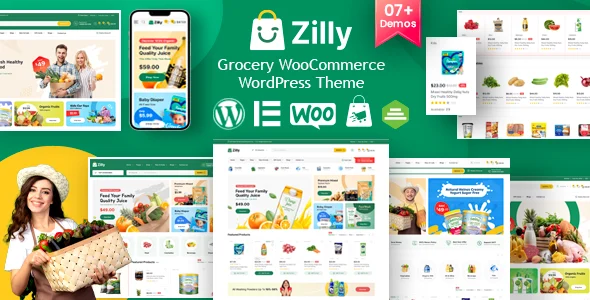
Zilly – Grocery Store WooCommerce WordPress Theme
Zilly Theme is a Bootstrap 5 WooCommerce WordPress theme for grocery stores with Elementor building, Ajax shop filters, and multivendor support.
- Daily automated updates
- VirusTotal 0/70 clean
- Licensed under GPL
- Secure 256-bit checkout
- Instant direct cloud link
What Is Zilly – Grocery Store WooCommerce WordPress Theme?
Zilly – Grocery Store WooCommerce WordPress Theme is a Bootstrap 5–based WordPress theme, engineered for agencies and independent developers to assemble grocery, supermarket, and organic food storefronts on WooCommerce without hand-coding template overrides. Its core architectural contribution is consolidation: variation swatches, variation image galleries, Elementor shop building, and Ajax product filtering ship inside one package, removing the dependency stitching that generic themes demand. In production, it operates as the presentation and commerce layer of a self-hosted WordPress stack, with the Zilly Core plugin mediating between Elementor widgets and WooCommerce data.
Key Features of the Theme
At runtime, the codebase resolves shop requests through six Ajax-driven navigation layouts that re-query WooCommerce product loops and repaint listing regions without a full page reload. Admin-side, the Customizer exposes real-time theme options such as colors, logos, and typography, while Elementor and Gutenberg render page structures from a shared widget library.
Architectural Highlights
- Ajax Shop Navigation Pipeline: Six filter mechanisms — sidebar, accordion, grid tab, slider tab, load more, and auto scroll — rebuild result sets client-side; v3.4 corrected filter count rendering and active filter state, and refined the view-mode, switcher, search, and sorting handlers.
- Bundled WooCommerce Extensions: Shop Builder Pro (Elementor WooCommerce builder addons), Variation Swatches for WooCommerce Pro, and Variation Images Gallery for WooCommerce Pro ship with the package; since v3.5, built-in swatch and gallery modules can replace third-party equivalents entirely.
- Conditional Asset Loading: A dynamic optimization system introduced in v3.4 enqueues module and widget CSS/JS only when the corresponding widget renders, cutting unused script weight on pages that never invoke those components.
- Multivendor and Order-State Handling: Dokan multivendor integration arrived in v1.2, pre-order compatibility in v2.3, and later releases repaired sales-notification data caching, guest checkout notices, refunded-order status rendering, and backorder stock error handling.
- Layout Inventory: 7+ homepages, 20 product archive layouts, 5 single-product layouts, 8 headers, 3 footers, plus blog grid, list, and single-video templates with YouTube embedding.
For teams splitting an engagement across retail verticals, the same Elementor-plus-Bootstrap 5 formula appears in Ferrano – Fashion Store WooCommerce Theme, which applies comparable Ajax filtering patterns to apparel inventories.
Who Should Use This Theme?
This package fits agency teams delivering grocery delivery, food market, and supermarket client builds, marketplace operators running Dokan multivendor vendor networks, and studios serving WPML or RTL audiences. Developers comfortable with Elementor widget composition and light PHP template overrides will extract the most value, since the child theme is included for code-level work. It is not designed for headless or decoupled architectures that consume WordPress only as a REST data source, nor for projects requiring raw static HTML output. When a brief later expands past groceries into general retail, Unimart – Multipurpose WooCommerce Theme extends a similar Elementor-driven storefront pattern across broader catalog categories without re-architecting the underlying WordPress install.
Compatibility & Runtime Requirements
Deployment assumes a standard LAMP-style WordPress host with WooCommerce active before theme activation.
| Engineering Metric | Deployment Specification |
|---|---|
| Base Technology / Framework | Bootstrap 5.x CSS framework; PHP, CSS, and JS source files delivered in the package |
| Runtime / Language Requirements | WordPress 4.9.x through 7.0.x; maintained against current PHP runtimes across the 3.6.x release line |
| Data Exchange / Communication Protocols | Ajax requests for shop filtering, cart, and header search; YouTube embed protocol for video blog templates |
| Core Dependencies / Engine Compatibility | WooCommerce 5.x–8.x, Elementor, Gutenberg, WPML, Dokan multivendor |
| Storage / Package Footprint | Widget-ready theme with included child theme, one-click demo importer, Font and Fontawesome icon sets, and the Inter Google Font |
How to Install & Deploy the Theme
- Environment Pre-check: Verify the server runs a PHP version within the maintained 3.6.x range, confirm WordPress and WooCommerce are active, and ensure Elementor is installed so the widget library registers correctly.
- Package Upload: Navigate to Appearance → Themes → Add New → Upload Theme in the WordPress administration interface, select the archive, and complete the install routine.
- Direct Activation: Click Activate; administrative menus, the Customizer panel, Zilly Core modules, and prompts for the three bundled WooCommerce plugins initialize and become operational immediately.
- Configuration & Testing: Run the Easy Demo Importer added in v3.6.5 to replicate a reference layout, then set colors, logos, and fonts through the Customizer. Activate the child theme for template-level overrides, and validate the Ajax filters, mini cart, and checkout flow with both guest and registered accounts.
Frequently Asked Questions
Does the theme support right-to-left languages and translation workflows?
Yes. The package declares WPML translation support and includes a pot file for string extraction, and RTL layouts are supported natively, so Arabic, Hebrew, and similar locales render without custom stylesheet rewrites.
Is a child theme included for code-level customization?
Yes. A child theme ships inside the package, letting developers override templates and PHP functions in isolation. Parent-side changes remain separated from project modifications, so staged customization work survives future parent refreshes intact.
Can variation swatches and galleries run without third-party plugins?
Yes. Since v3.5, native Variation Swatch and Variation Gallery modules render attribute selectors and gallery media directly. Administrators can disable separate swatch or gallery plugins and rely on the built-in rendering path, reducing plugin conflicts.