BuildPress — Multi-purpose Construction and Landscape WordPress Theme
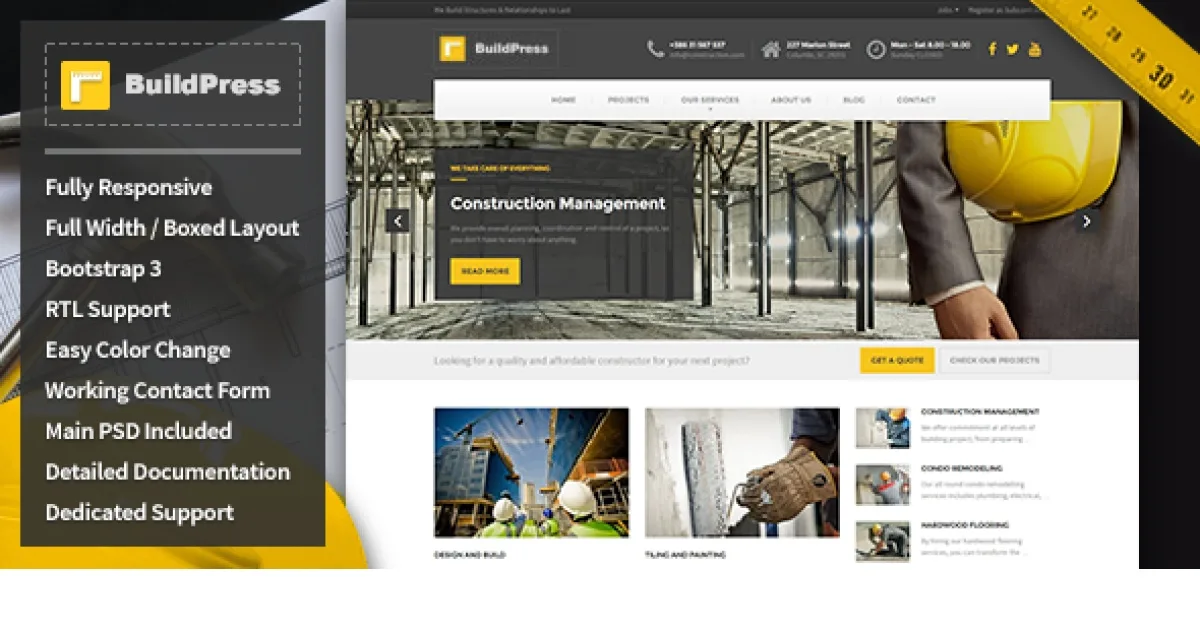
BuildPress WordPress Theme is a multi-purpose construction and landscape theme with 7+ demos, a drag-and-drop page builder, and Live Customizer controls.
- Daily automated updates
- VirusTotal 0/70 clean
- Licensed under GPL
- Secure 256-bit checkout
- Instant direct cloud link
What Is BuildPress WordPress Theme?
BuildPress WordPress Theme is a multi-purpose WordPress theme engineered for agencies and freelance developers delivering construction, contracting, and landscaping client sites. It resolves the bottleneck of assembling sector-specific marketing sites from scratch by shipping 7+ prebuilt demos, 4+ header variants, and 20+ page layouts that cover Classic, Landscape, Light, Coming Soon, and Coming Soon Video (video asset included) configurations. In production workflows, it functions as a deployable base package: teams import a demo, remap content through the builder, and hand off a editable site without touching template PHP for routine layout changes.
Key Features of the Theme
At runtime, the package renders pages through the WordPress template hierarchy: layout data authored in the grid builder is parsed into column and row structures, injected into the active template, and styled by theme stylesheet rules that the Live Customizer overrides in real time.
Architectural Highlights
- Grid-Based Page Builder Integration: Layout composition happens through a drag-and-drop grid engine; rows, columns, and content widgets are serialized as structured layout data and rendered into the page DOM, so editors restructure homepages, about pages, and contact pages without writing markup.
- Live Customizer State Synchronization: Color palettes, layout switches, and widget assignments are dispatched through the WordPress Customizer API, which writes theme_mod values and previews changes synchronously in the browser pane, shortening the revision loop for non-technical stakeholders.
- Header and Layout Variant System: The package exposes 4+ header structures and 20+ page layouts as selectable templates; swapping a variant changes which template part loads in the hierarchy rather than requiring CSS surgery per client.
- Coming Soon Page with Video Support: A dedicated Coming Soon template and a video variant (video file bundled with the package) let contractors stage a pre-launch state by toggling the template without deploying a separate landing environment.
- Visual Composer Compatibility: The codebase supports Visual Composer as an additional authoring layer, giving teams already standardized on that builder a drop-in path instead of migrating content models.
For contractors who need a heavier Elementor-driven stack later in the project lifecycle, teams often pair the initial build with Brickz – Construction WordPress Theme, which extends the same contractor vertical with 18+ Elementor demos and a template builder.
Who Should Use This Theme?
This architecture fits WordPress agencies maintaining a portfolio of small-to-mid-size contractor, builder, and landscaping sites where predictable handoff and fast demo-to-production turnaround matter more than custom backend logic. It also suits solo developers producing brochure-style business sites that must remain editable by office staff through the Customizer and the drag-and-drop grid. It is not intended for teams building headless WordPress frontends, application-grade custom post type ecosystems, or sites requiring programmatic data pipelines; those projects need a code-first theme or custom development rather than a demo-driven multi-purpose package. Developers who need a commerce layer can bolt WooCommerce onto the installation and connect it with Vehica as a reference for listing-driven search patterns, though BuildPress itself targets presentation and marketing content rather than inventory-heavy catalogs.
Compatibility & Runtime Requirements
Baseline constraints follow standard WordPress theme deployment on a conventional LAMP stack.
| Engineering Metric | Deployment Specification |
|---|---|
| Base Technology / Framework | WordPress theme package (PHP-rendered templates) |
| Runtime / Language Requirements | PHP with WordPress core runtime; standard MySQL/MariaDB database layer |
| Data Exchange / Communication Protocols | HTTP request/response via WordPress admin and Customizer API; theme_mod and option storage writes |
| Core Dependencies / Engine Compatibility | WordPress theme system; bundled page builder; Visual Composer supported |
| Database / Storage Footprint | WordPress options/theme_mod tables plus bundled demo content and included video asset |
How to Install & Deploy the Theme
- Environment Pre-check: Verify the host runs a current PHP version compatible with the WordPress core release, confirm the database is reachable, and ensure the media upload directory is writable so demo images and the bundled video import cleanly.
- Package Upload: Upload the theme archive through Appearance, Add New, Upload in the administration interface, or transfer the extracted folder into wp-content/themes via SFTP for server-level control.
- Direct Activation: Click Activate. Header variants, page layouts, builder modules, and Customizer panels register immediately, and the theme becomes fully operational for content entry.
- Configuration & Testing: Import the chosen demo (Classic, Landscape, Light, or a Coming Soon variant), adjust colors and layout through the Live Customizer while previewing in real time, restructure pages in the grid builder, and validate output across templates before go-live.
Teams maintaining multiple contractor sites in parallel can standardize staging by comparing this package with Emarat – Construction WordPress Theme, which uses Elementor and Redux instead of the bundled builder, before committing a client to one authoring stack.
Frequently Asked Questions
Does the package include the video used by the Coming Soon Video page?
Yes. The Coming Soon Video page variant ships with its video asset included, so developers enable the pre-launch template and attach the bundled media without sourcing or encoding external footage during deployment.
Can developers switch between the bundled page builder and Visual Composer on the same site?
Yes. Visual Composer is supported as an authoring layer alongside the built-in grid builder, allowing teams to keep existing content models while introducing Visual Composer pages on selected templates during phased migrations.
Do color and layout changes require code edits or template redeploys?
No. The Live Customizer writes theme modifications and renders changes in a real-time preview pane, so palette, layout, and widget adjustments take effect through the admin interface without editing PHP or CSS files.