Brickz – Construction WordPress Theme
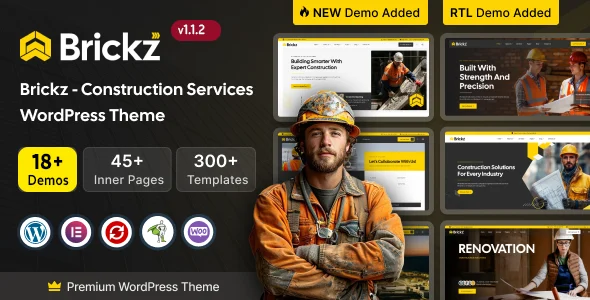
Brickz Construction WordPress Theme is an Elementor theme with 18+ demos, RS Template Builder, and WooCommerce support for contractor sites.
- Daily automated updates
- VirusTotal 0/70 clean
- Licensed under GPL
- Secure 256-bit checkout
- Instant direct cloud link
What Is Brickz Construction WordPress Theme?
Brickz Construction WordPress Theme is an Elementor-driven WordPress theme, engineered for agencies and contractors to assemble construction-sector websites without writing custom PHP or CSS. It removes the bottleneck of hard-coded chrome regions by routing headers, footers, mega menus, popups, and 404 states through the RS Template Builder engine, which binds reusable Elementor layouts to conditional display rules. In production it operates as a full site scaffold: 18+ demos (nine multi-page, nine onepage), 45+ inner pages, and 300+ ready-made sections import in a single pass, then remain editable from Elementor Site Settings.
Key Features of the Theme
The theme intercepts the standard WordPress template hierarchy through RS Template Builder display conditions, injecting Elementor-built layouts wherever a rule matches. Rendering executes server-side in PHP before Elementor processes widget output, so global design tokens stay synchronized across every routed region.
Architectural Highlights
- Conditional template override layer: RSTB registers nine template types — Header, Footer, Page Title, Mega Menu, Popup, Offcanvas Panel, Archive, Single Post, and 404 Error — applied via display conditions instead of duplicated child-theme files, reducing maintenance across multi-template builds.
- Elementor Kit design tokens: global colors and typography resolve from Elementor Site Settings, so palette changes cascade through all 300+ sections without recompiling SCSS source.
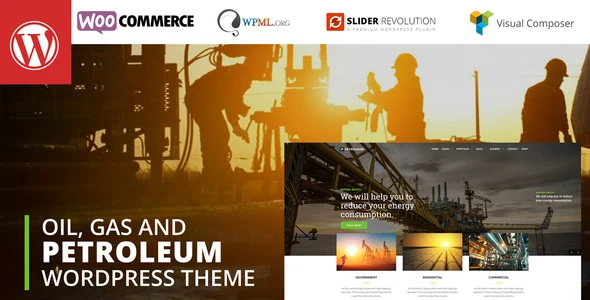
- One-pass demo importer: the installer streams bundled demo payloads, including images and icons, over cURL or allow_url_fopen with OpenSSL enabled; version 1.1.2 extended the catalog with an Oil & Gas set in both multi-page and onepage variants.
- WooCommerce commerce layer: compatibility spans WooCommerce 6.x through 10.x with a dedicated shop demo, exposing product archives and checkout flow as Elementor-editable templates.
Retail-adjacent builds that need Ajax catalog filtering or multivendor flows beyond this shop demo can extend the same Elementor-plus-WooCommerce pattern by deploying Zilly for grocery commerce.
Who Should Use This Theme?
This package targets construction companies, building contractors, engineering firms, architecture studios, renovation and maintenance providers, and real estate or infrastructure project teams that need portfolio showcases, service pages, team modules, testimonials, and a blog inside one codebase. Agencies running WPML multilingual deployments also fit, since translation hooks are declared at the theme level. It is a poor match for block-editor-first teams: the build is not Gutenberg optimized, so composition runs exclusively through the Elementor canvas rather than native block patterns. Developers serving other verticals on the same stack can apply the equivalent Elementor-WPML architecture through Ellington for academic sites.
Compatibility & Runtime Requirements
Deployment succeeds only after the host meets the importer and builder runtime thresholds listed below.
| Engineering Metric | Deployment Specification |
|---|---|
| Base framework | Underscores (_s) starter; PHP, CSS, SCSS, and JS source files; 4+ column grid; widget-ready regions |
| PHP runtime thresholds | memory_limit 256M; max_execution_time 600; post_max_size 128M; upload_max_filesize 128M; max_input_vars 5000; max_file_uploads 500 |
| Network / transport | cURL library or allow_url_fopen ON, with OpenSSL enabled, for demo import transfers |
| Engine compatibility | WordPress 5.2.x through 7.0.x; Elementor and Elementor Pro; WooCommerce 6.x through 10.x; Revolution Slider (bundled) |
| Plugin integrations | Contact Form 7, Gravity Forms, Easy Digital Downloads, WPML |
| Client rendering | Firefox, Safari, Opera, Chrome, Edge; responsive layout; high-resolution assets |
How to Install & Deploy the Theme
- Environment pre-check: confirm the PHP limits (256M memory, 600-second execution window, 128M upload ceiling, 5000 max_input_vars) and verify cURL or allow_url_fopen with OpenSSL are active before running the importer.
- Package upload: transfer the theme archive through the Appearance upload screen or copy the extracted directory into wp-content/themes on the host.
- Direct activation: click Activate; administrative menus for the bundled plugins — Elementor, RS Template Builder, and Revolution Slider — initialize immediately, and all core modules become operational.
- Configuration and testing: run the one-click demo import to materialize a chosen demo (multi-page or onepage), then adjust global colors and typography under Elementor Site Settings and validate header, footer, and mega menu output across viewports.
Frequently Asked Questions
Does the one-click demo import include demo images and icons?
Yes. The importer transfers every image and icon used in the selected demo, so the staged site matches the reference layout without sourcing media separately, provided cURL or allow_url_fopen with OpenSSL remains active.
Is page composition handled by the block editor?
No. The package is not Gutenberg optimized; all layout composition, header and footer building, mega menu design, and popup creation run through the Elementor front-end canvas and RS Template Builder templates instead of native block patterns.
How are multilingual deployments handled?
Through WPML, which ships as a declared compatible integration. Strings, menus, and templates across the 18+ demos can be translated, letting a single installation serve multiple locales without duplicating the codebase per language.