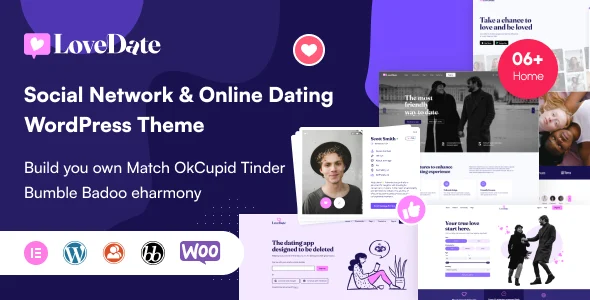
LoveDate – Social Dating Network WordPress Theme
LoveDate dating WordPress theme with member matching, real-time chat and credit monetization, built on Elementor and WooCommerce for agencies.
- Daily automated updates
- VirusTotal 0/70 clean
- Licensed under GPL
- Secure 256-bit checkout
- Instant direct cloud link
What Is LoveDate?
LoveDate is a social dating WordPress theme, engineered for agencies and independent developers to ship matchmaking services, dating communities, and LGBT social networks without writing custom PHP. Its core architectural contribution is replacing the BuddyPress and bbPress stack with a self-contained member system (LoveDate Members) plus the Jws Matching engine, eliminating the plugin-fragmentation fatal errors recorded in prior releases when BuddyPress was deactivated. In production it functions as the presentation and business-logic layer of a monetized community, pairing Paid Memberships Pro plans with WooCommerce credit packages and an optional Flutter client synchronized through the bundled API plugin.
Key Features of the Theme
At runtime, the codebase renders member records through the LoveDate Members custom architecture, executes matching queries through the Jws Matching plugin, and streams chat events across Pusher channels instead of polling the web server.
Architectural Highlights
- Matching engine: Computes match percentages and radius-based location searches, records likes and visitor history, exposes who-liked-you views, supports Rewind, and gates Super Likes behind paid packages with gender-based free-usage settings.
- Real-time communication stack: Pusher-backed chat with a Mini Chat window rendered on every page, plus emoji, GIF, and file exchange; push and email notifications dispatch on new matches, likes, and profile visits.
- Identity and privacy layer: Field-group profiles searchable on any field, photo visibility tiers (public, members-only, friends-only), password-protected galleries with guest blur, email and identity verification, reCAPTCHA v2 on login and registration, and Facebook/Google login via Nextend Social Login.
- Phone and QR authentication: Version 4.2.9 added SMS or WhatsApp code login and QR-code entry, both routed through the included LoveDate API plugin.
- Migration and tooling: A migration utility imports existing BuddyPress profiles and groups; Redux Framework controls header, footer, typography, credits, and Super Like parameters, while the one-click importer replays every demo homepage and template.
When a client’s member directory outgrows the bundled layouts, deploying The Grid alongside the package adds masonry, justified, and slider grids with a dedicated skin builder and social stream ingestion.
Who Should Use This Theme?
The codebase targets three personas: agencies delivering client-owned dating or matchmaking properties, developers who need forums, groups, and member directories without maintaining BuddyPress, bbPress, BP Profile Search, BP Xprofile Custom Field Types, and MediaPress, and operators monetizing through Paid Memberships Pro plans, WooCommerce credits, and Super Like packages. Teams that already run multilingual Elementor deployments, such as builds shipped on Seniar, will recognize the same WPML and RTL conventions here, which shortens QA on localized releases. It is not built for Gutenberg-first editing workflows, since the block editor is explicitly unsupported, nor for buyers expecting the Flutter mobile app in the base package, because that application is sold separately.
Compatibility & Runtime Requirements
The baseline runtime is a standard WordPress host; real-time chat additionally requires Pusher credentials, and phone or QR authentication requires the bundled API plugin to stay active.
| Engineering Metric | Deployment Specification |
|---|---|
| Base Technology / Framework | WordPress theme (PHP, HTML, CSS, Less, SCSS, JS sources), Bootstrap 5.x/4.x grid, Elementor and Elementor Pro widgets, Redux Framework options layer |
| Runtime / Language Requirements | WordPress 5.5.x through 7.1.x; PHP 8.4 and jQuery 3.5+ verified in v4.2.9; IE10, IE11, Firefox, Safari, Opera, Chrome, Edge |
| Data Exchange / Communication Protocols | Pusher channels for real-time chat; LoveDate API plugin endpoints for SMS/WhatsApp and QR authentication plus mobile synchronization; reCAPTCHA v2 verification |
| Core Dependencies / Engine Compatibility | WooCommerce 5.x through 10.x, Paid Memberships Pro, WPML, Contact Form 7, Jws Variation Swatches for WooCommerce |
| Package / Storage Footprint | Download archive includes lovedate-members.zip and lovedate-api.zip; widget-ready, responsive 4+ column layout spanning phone, tablet, and desktop viewports |
How to Install & Deploy the Theme
- Environment pre-check: Confirm PHP 8.4-class hosting, a supported WordPress core version, and reachable Pusher credentials; on legacy BuddyPress sites, back up profiles and groups before running the migration utility.
- Package upload: Transfer the theme archive through Appearance > Add New Theme > Upload, then install lovedate-members.zip, lovedate-api.zip, and the remaining bundled plugins (Elementor, WooCommerce, Paid Memberships Pro, Jws Variation Swatches) from the plugins folder inside the download package.
- Direct activation: Activate the theme from the administration interface; the Redux options panel, Jws Settings menus, Elementor widgets, and all matching, chat, and credit modules initialize immediately and become fully operational.
- Configuration and testing: Run the one-click demo importer to replay every homepage and template, set credits, Super Likes, and gender-based free usage in Theme Options, then validate registration behind reCAPTCHA v2, a radius search, and a Pusher chat exchange on staging before go-live.
Frequently Asked Questions
Can existing BuddyPress data be moved into this system?
Yes. A built-in migration tool moves existing BuddyPress profiles and groups into LoveDate Members. Version 4.3.0 replaced the documentation’s BuddyPress chapter with a Members chapter and fixed fatal errors that previously occurred on member profiles and in chat.
Is the mobile application included with the theme package?
No. The Flutter application is distributed separately on CodeCanyon for Android and iOS. Accounts, likes, matches, messages, credits, and plans stay synchronized between site and app through the LoveDate API plugin, which ships inside the theme package.
Does Jws Matching require a special step after theme updates?
Yes. Jws Matching 3.1.0 now depends on LoveDate Members. After a theme update, reinstall it from the plugins folder via Plugins > Add New Plugin > Upload Plugin, then confirm Replace current with uploaded to avoid fatal errors.