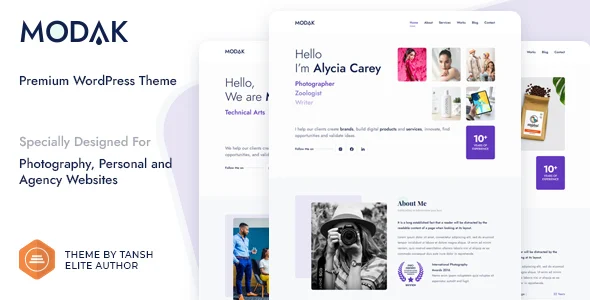
Modak – One Page WordPress Theme
Modak is a one page WordPress theme built on Bootstrap 5 and Elementor, with Kirki Customizer controls, Schema.org markup, and demo import for agency and portfolio sites.
- Daily automated updates
- VirusTotal 0/70 clean
- Licensed under GPL
- Secure 256-bit checkout
- Instant direct cloud link
What Is Modak One Page WordPress Theme?
Modak is a WordPress theme built on PHP, HTML5, CSS3, and the Bootstrap v5 framework, engineered for developers and freelancers who need to assemble single-page agency, photography, portfolio, or personal branding sites without writing custom code. It resolves the common bottleneck of one-page builds: synchronizing header layouts, typography, sidebar positions, and section visibility across a single scrolling document without editing template files. In production, it functions as a deployable base where visual composition happens through the free Elementor builder and site-wide parameters are managed through the Kirki-powered WordPress Customizer.
Key Features of the Theme
The rendering flow is straightforward: WordPress resolves the template hierarchy, Modak outputs markup over the Bootstrap 5 grid, and Elementor widgets populate the page canvas while Customizer values are injected as inline design tokens at render time.
Architectural Highlights
- Kirki Customizer Layer: Exposes padding, background, color, typography (Google Fonts), element On/Off toggles, and logo (image or text) controls with live preview, so design tokens update in the browser before publishing.
- Elementor Integration (Free Version): The demo is built entirely on the free Elementor plugin; frontend drag-and-drop editing renders results in real time, and upgrading to Elementor Pro remains optional rather than a dependency.
- Header and Footer Layout System: Three header layouts and selectable footer column structures are switchable globally through the Customizer, removing the need to duplicate header templates per page.
- Blog Architecture: Three main layouts (no sidebar, left sidebar, right sidebar), post grid styles (Classic, Masonry, Grid in 2 or 3 columns), a first-post display toggle, excerpt length, and pagination controls are all Customizer-driven; sidebar position can also be overridden per individual post or page.
- SEO and Translation Layer: Schema.org markup is emitted in the document head for machine readability, W3C-validated HTML5 output supports SEO and cache plugins, and a bundled .pot file enables translation into other languages.
For teams that need an adjacent vertical after shipping a one-pager, the same Customizer-plus-Elementor workflow scales into multi-page builds — deploying Beratung for finance and consulting clients follows an identical architecture with dedicated advisory layouts.
Who Should Use This Theme?
The package fits freelance developers, small agencies, and technical self-starters assembling lead-generation pages, virtual business cards, resumes, and photography or portfolio showcases under a tight delivery window. Because one-click demo import reproduces the reference structure, it suits staging workflows where a client-approved skeleton must be live within a single session. It is not intended for teams building block-editor-first sites: the package is explicitly not Gutenberg optimized, so development plans centered on core block themes or full-site editing should look elsewhere. Content managers who prefer writing in the classic editor alongside Elementor composition will operate comfortably; pure no-code users still need to learn two interfaces — Customizer and Elementor — to reach full fidelity.
Compatibility & Runtime Requirements
Deployment assumes a self-hosted WordPress installation with the free Elementor plugin available, and optional Contact Form 7 for form handling.
| Engineering Metric | Deployment Specification |
|---|---|
| Base Framework | Bootstrap v5, HTML5/CSS3, PHP templates |
| Runtime Platform | WordPress 5.9.x through 6.5.x |
| Page Builder | Elementor (free version; Pro optional) |
| Forms | Contact Form 7 markup and mail management |
| Browsers | Firefox, Safari, Opera, Chrome, Edge |
| Deliverables | PHP, CSS, and JS files; child theme included; widget-ready areas |
| Layout | Responsive, 4+ column structures, high-resolution assets |
How to Install & Deploy the Theme
- Environment Pre-check: Confirm the server runs a supported WordPress core version (5.9.x–6.5.x) and install the free Elementor plugin, since page composition depends on it. Contact Form 7 should be present if the contact section is required.
- Package Upload: Transfer the theme archive through the WordPress administration interface (Appearance → Add New → Upload) or place the extracted PHP/CSS/JS files directly into the wp-content/themes directory.
- Direct Activation: Activate the theme from the Appearance screen; the Customizer menus, page templates, widget areas, and bundled child theme become operational immediately. If the child theme is preferred for customization, activate it after the parent so template overrides inherit correctly.
- Configuration & Testing: Run the one-click demo import to reproduce the reference structure, then adjust header layout, footer columns, typography, blog grid style, and sidebar positions under Customize. Validate the contact form, social links, and Schema.org output before go-live.
When a client later outgrows the single-page scope into a commerce or content-driven property, the migration path typically involves swapping the visual shell while preserving content — for kitchen and interior design verticals, Cocina provides that WooCommerce-ready equivalent within the same Elementor ecosystem.
Frequently Asked Questions
Is the demo reproducible without purchasing Elementor Pro?
Yes. The official demo is built exclusively on the free Elementor version, so every demo section can be imported and edited without Pro widgets; the Pro upgrade remains an optional third-party enhancement.
Can individual posts override the global sidebar setting?
Yes. While single post and page sidebar positions (none, left, or right) are set globally in the Customizer, each post and page carries a per-item override, and a Blank Page template removes header and footer entirely.
Does the theme support Gutenberg block editing?
No. The package is not marked as Gutenberg optimized; content composition is designed around Elementor and the Customizer rather than the block editor or full-site editing workflows.