Product Bundles for WooCommerce
Product Bundles for WooCommerce is a WordPress plugin that lets developers group SKUs into configurable bundle packages with per-item quantity rules and dynamic pricing.
- Daily automated updates
- VirusTotal 0/70 clean
- Licensed under GPL
- Secure 256-bit checkout
- Instant direct cloud link
What Is Product Bundles for WooCommerce?
Product Bundles for WooCommerce is a WordPress plugin engineered for WooCommerce store developers and agencies to assemble multiple catalog items into sellable bundle packages. It resolves the native WooCommerce limitation where the cart treats each SKU independently, preventing merchants from selling curated sets, kits, or grouped offers as a single purchasable unit. In production, it operates as an admin-configurable module that generates bundle products, applies grouped pricing logic, and manages the add-to-cart flow for combined inventory items.
Key Features of the Plugin
The plugin executes by intercepting WooCommerce product data structures: administrators define a parent bundle product, attach child catalog items with per-item quantity ranges, and the engine registers the bundle as a purchasable product type that writes grouped line items into the cart session on add-to-cart events.
Architectural Highlights
- Bundle Product Type Registration: The module registers a custom bundle product type within the WooCommerce class hierarchy, so bundled packages appear alongside simple, variable, and grouped products in the standard admin product editor.
- Per-Item Quantity Controls: Each child item can carry configurable minimum and maximum quantity rules, letting the bundle engine validate customer input server-side before the cart update executes.
- Dynamic Bundle Pricing: Pricing logic supports calculating a bundle price from its child items, including percentage or fixed discounts applied across the group, so totals recalculate without manual price synchronization.
- Cart and Checkout Integration: Bundled items traverse the standard WooCommerce cart, checkout, and order pipeline, meaning order emails, order meta, and backend order views receive the grouped line items natively.
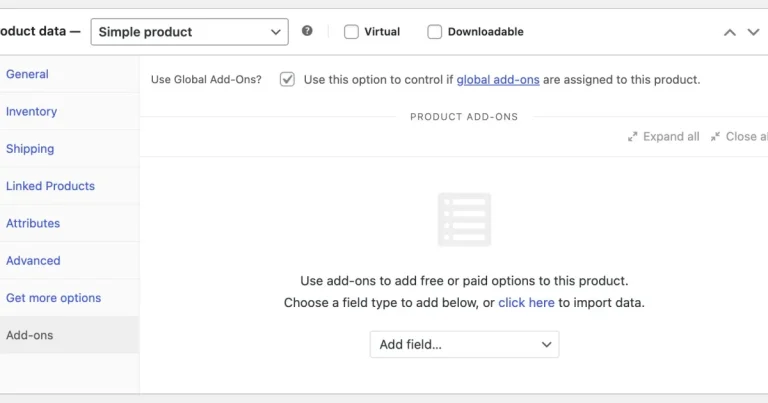
- Admin Configuration Panel: A dedicated settings interface governs bundle appearance, layout of bundled item lists on the product page, and catalog visibility, keeping configuration out of template files.
For stores that combine bundling with catalog curation, pairing this module with Product Filters WooCommerce Extensions lets developers expose bundle categories through preset-driven shop filtering without custom query rewrites.
Who Should Use This Plugin?
This codebase targets WooCommerce plugin developers, agency engineering teams building commerce sites for retail clients, and store operators who need gift sets, starter kits, or multi-SKU offers maintained through the WordPress admin. It fits production environments where merchandising rules change frequently and prices must derive from child item data rather than hardcoded values. It is not intended for non-technical users expecting a drag-and-drop bundle builder outside the standard product editor, nor for headless storefront teams requiring custom REST bundle endpoints without additional integration work. Teams running bulk catalog operations may also evaluate the Product CSV Import Suite WooCommerce Extension to populate bundle child SKUs before assigning them to packages in this engine.
Compatibility & Runtime Requirements
Deployment depends on a standard WordPress plus WooCommerce stack, with no proprietary server extensions required.
| Engineering Metric | Deployment Specification |
|---|---|
| Base Technology / Framework | WordPress plugin architecture built on WooCommerce |
| Runtime / Language Requirements | PHP runtime per current WooCommerce minimums; WordPress 5.x or later |
| Data Exchange / Communication Protocols | WooCommerce cart session and AJAX add-to-cart flows |
| Core Dependencies / Engine Compatibility | WooCommerce core product types, cart, checkout, and order classes |
| Database / Storage Footprint | Bundle definitions stored as WooCommerce product meta within existing WordPress tables |
How to Install & Deploy the Plugin
The deployment path follows the conventional WordPress administrative workflow, requiring no command-line steps or manual database writes.
- Environment Pre-check: Confirm the host runs a compatible PHP version, WordPress is current, and WooCommerce is installed and activated, since the plugin’s product-type registration hooks into WooCommerce classes at load time.
- Package Upload: Transfer the plugin archive through the WordPress admin plugin installer, or extract the folder into wp-content/plugins via SFTP for staging environments under version control.
- Direct Activation: Click Activate in the plugins list; the bundle product type, admin menu entries, and cart integration hooks initialize immediately and the module is production-ready.
- Configuration & Testing: Open the settings panel to set bundle display and pricing preferences, create a test bundle product with child items and quantity rules, then validate the add-to-cart flow, price totals, and checkout output on a staging cart before release.
Frequently Asked Questions
Does the plugin require any additional plugins beyond WooCommerce to function?
No. The bundle engine hooks directly into WooCommerce core product, cart, and checkout classes. A standard WordPress installation with WooCommerce active is the only prerequisite, and no third-party commercial extensions are mandatory for core bundling operations.
Are bundled child items removed from the catalog once grouped into a bundle?
No. Child products remain independently visible and purchasable in the catalog. The bundle references existing WooCommerce products, so inventory and pricing for child items continue to behave as standalone listings unless administrators hide them manually.
Can customers adjust the quantity of individual items inside a bundle?
Yes. Each child item supports administrator-defined minimum and maximum quantity constraints. The plugin validates customer input against those rules during the add-to-cart event, and the cart session stores the adjusted quantities per line item.
Does bundle configuration require editing theme template files?
No. Bundle appearance and layout options are managed through the plugin’s admin settings panel, which renders bundled item lists through WooCommerce’s standard product page rendering path without theme file overrides.