Helix – Yoga Club Calendar WordPress Theme
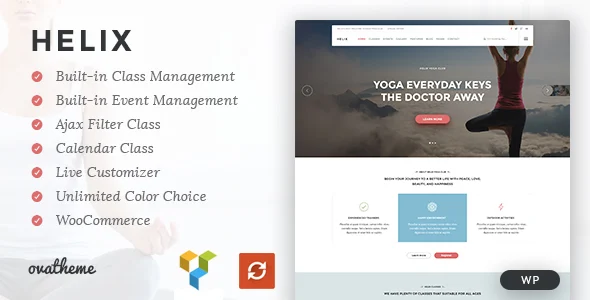
Helix Yoga Club Calendar WordPress Theme is a WPBakery-built schedule engine for agencies deploying class, event, and course calendars on WordPress.
- Daily automated updates
- VirusTotal 0/70 clean
- Licensed under GPL
- Secure 256-bit checkout
- Instant direct cloud link
What Is Helix Yoga Club Calendar WordPress Theme?
Helix Yoga Club Calendar WordPress Theme is a PHP/CSS/JS WordPress theme, engineered for developers and agencies to build schedule-driven class, event, and course websites for yoga studios and dance clubs. It resolves the recurring bottleneck of presenting recurring class timetables by shipping native Grid, List, and Calendar rendering modes backed by an Ajax filter pipeline, eliminating the need for a separate scheduling plugin on standard deployments. In production workflows it functions as a self-hosted theme package that pairs with bundled page-builder tooling so studios can publish, filter, and update timetables through standard WordPress administrative screens.
Key Features of the Theme
At runtime, the codebase registers custom class and event content structures, then dispatches Ajax requests to filter timetable data without full page reloads, rendering results through the WPBakery element layer. Styling, layout width, and typography resolve from the Live Customizer, so color and font tokens are written into the front-end output rather than hardcoded into templates.
Architectural Highlights
- Ajax-filtered class calendar: The calendar element (stabilized in the 1.3.6 changelog with a dedicated shortcode/element fix and responsive calendar fixes in 1.2) queries class records asynchronously, so date and category filtering updates the DOM without re-rendering the full document tree.
- WPBakery Page Builder integration: Bundled with the theme and updated through v8.7.3 in version 1.4.9, the builder exposes pattern templates as reusable layout structures, letting operators assemble pages from pre-defined element rows instead of writing PHP.
- Three timetable presentation modes: Grid, List, and Calendar views share the same underlying class data source, so a schedule change propagates across all rendering modes without duplicate data entry.
- Live Customizer with unlimited color choices: Theme modifications persist through the WordPress Customizer API, alongside Google Font support and wide/boxed layout switches applied at the container level.
- Bundled Slider Revolution: The hero slider dependency tracks current upstream releases (6.7.58 as of v1.4.9), with the changelog showing continuous patching for cross-browser slideshow behavior dating back to the Firefox fix in 1.1.
When a studio project outgrows the built-in timetable and needs richer recurring-event rules, booking fields, or venue taxonomies, pairing this theme with Modern Events Calendar extends the schedule layer without replacing the front-end design.
Who Should Use This Theme?
This package targets WordPress developers and small agencies delivering client sites for yoga studios, fitness clubs, dance schools, and course providers that need timetable publication as the core site function. It suits teams comfortable administering WPBakery layouts, importing demo content as a staging baseline, and overriding template files in a child theme — the changelog confirms a child theme was added in version 1.2 for exactly that override path. It is not intended for developers building block-editor-first projects: the theme is explicitly not Gutenberg optimized, so block-native workflows will fight the bundled builder stack. Teams requiring high-resolution asset pipelines should also note the package ships without high-resolution media declarations.
Compatibility & Runtime Requirements
The baseline constraint is a standard LAMP WordPress installation running a compatible core version and the bundled plugin stack.
| Engineering Metric | Deployment Specification |
|---|---|
| Base Technology / Framework | WordPress theme (PHP templates, CSS, JS files); Bootstrap referenced in changelog updates |
| Runtime / Language Requirements | PHP-executing WordPress host; compatible with WordPress 4.9.x through 7.0.x per official attributes |
| Data Exchange / Communication Protocols | Ajax requests for class filtering; HTTP(S) delivery; Contact Form 7 for form submissions |
| Core Dependencies / Engine Compatibility | WPBakery Page Builder 8.7.3, Slider Revolution 6.7.58, Contact Form 7, WPML |
| Browser & Layout Support | IE10/IE11, Firefox, Safari, Opera, Chrome; responsive two-column layout, widget-ready |
For commerce extensions, the changelog shows a WooCommerce fix in v1.4.9; developers building shop-capable studio sites often standardize their stack on Flatsome when multi-vendor retail outweighs the timetable-first architecture of this package.
How to Install & Deploy the Theme
Deployment follows the standard WordPress theme lifecycle, with the bundled dependencies installed alongside the parent package.
- Environment pre-check: Confirm the host runs a WordPress version within the 4.9–7.0 compatibility range, PHP executes correctly, and required plugins (WPBakery Page Builder, Slider Revolution, Contact Form 7) can be installed via the TGM plugin activation routine referenced in the changelog.
- Package upload: Upload the theme archive through the WordPress administration interface (Appearance → Add New → Upload Theme) or transfer the extracted PHP/CSS/JS files to wp-content/themes via SFTP.
- Direct activation: Activate the theme from the Appearance screen; class management, event management, calendar elements, and Customizer controls become operational immediately, with no additional registration steps.
- Configuration & testing: Import the included demo content to establish a working baseline (import routine updated in v1.4.4), set color, font, and layout options in the Live Customizer, then exercise the Ajax class filter across Grid, List, and Calendar views to validate rendering before launch.
Frequently Asked Questions
Can the theme be translated into non-English languages?
Yes, the package ships a .pot file, so strings can be extracted and translated with standard WordPress localization tooling. Combined with declared WPML compatibility, multilingual studio sites can run translated class and event content.
Does the calendar work on mobile breakpoints?
Yes, the responsive layout is a core attribute, and the changelog documents dedicated responsive calendar fixes (v1.2) plus a calendar shortcode/element repair (v1.3.6), indicating the mobile timetable rendering has been actively patched across releases.
Are sidebar configurations flexible per page?
Yes, the theme supports left sidebar, right sidebar, and no-sidebar layouts, selectable through the administrative options, so schedule pages can render full-width while blog or course pages retain widget areas.