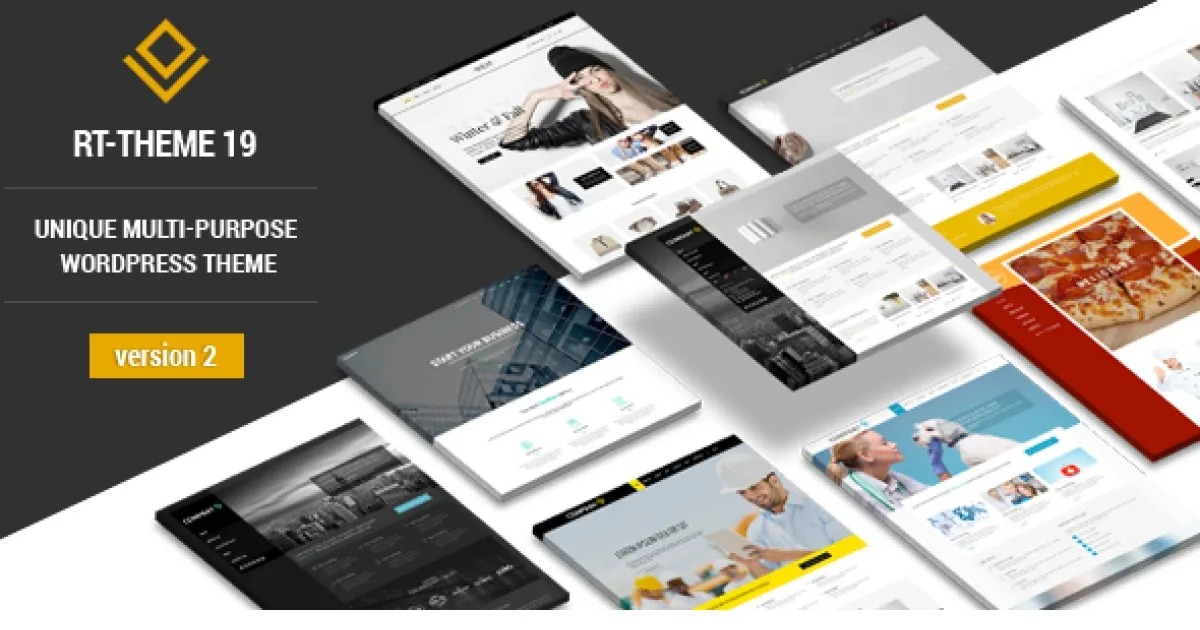
RT-Theme 19 | Multi-Purpose WordPress Theme
RT-Theme 19 is a multi-purpose WordPress theme for developers and agencies building responsive, customizable business and product websites.
- Daily automated updates
- VirusTotal 0/70 clean
- Licensed under GPL
- Secure 256-bit checkout
- Instant direct cloud link
What Is RT-Theme 19?
RT-Theme 19 is a WordPress multi-purpose theme, engineered for developers and agencies to deploy responsive business, corporate, and product showcase websites from a single codebase. It resolves the common bottleneck of rebuilding layout scaffolding per client by shipping a verified feature set — responsive design, high customizability, a solid framework layer, and extended documentation — that maps directly onto repeatable production builds. Within agency workflows, it functions as a baseline installation that can be re-skinned and reconfigured for successive client deliverables without rewriting the underlying template architecture.
Key Features of the Theme
The package executes through the standard WordPress template hierarchy: incoming requests resolve against template files, which render the DOM tree and enqueue registered CSS and JS assets. Configuration set in the theme options panel is written as site state and read at render time, so layout changes propagate without touching source files.
Architectural Highlights
- Responsive design layer: The front-end grid adapts across viewport breakpoints, keeping DOM structure stable while CSS rules reflow content — this directly affects CLS behavior when images and blocks resize on mobile viewports.
- High customizability surface: Colors, typography, and layout parameters are exposed as configurable options rather than hard-coded values, letting developers rebrand an installation through the admin panel instead of editing templates manually.
- Solid framework foundation: The internal framework centralizes shared logic — options handling, asset registration, and layout modules — so overrides follow predictable extension points rather than scattered conditional code.
- Product showcase modules: Product pages ship in three structural variants — a full-elements layout, a single-image layout, and a tab-less layout — giving teams pre-verified rendering paths for catalog content.
- Extended documentation: The distribution includes developer-facing docs covering installation, configuration, and module usage, reducing onboarding time when handing a build to a second engineer.
For teams that need to compare frameworks before committing, Total – Responsive Multi-Purpose WordPress Theme offers an alternative multi-builder baseline with WPBakery, Elementor, and Gutenberg demo imports; stacking both in staging lets you benchmark template hierarchy overrides side by side.
Who Should Use This Theme?
This theme fits freelance developers and small-to-mid agencies running multi-client WordPress production: teams that need a documented, reconfigurable base for corporate sites, product catalogs, and landing pages. It also suits maintenance contractors who inherit installs and need a predictable options-driven structure to audit. It is not aimed at non-technical site owners who want pure drag-and-drop page building with zero configuration, and it is not a headless theme — rendering remains server-side within the standard WordPress loop. Teams planning commerce extensions should validate WooCommerce compatibility in staging; when rule-based pricing becomes part of the deliverable, WooCommerce Flexible Pricing layers BOGO and category-level cart rules on top of the product modules.
Compatibility & Runtime Requirements
The theme runs inside a standard WordPress stack, so baseline constraints mirror the core platform rather than introducing exotic dependencies.
| Engineering Metric | Deployment Specification |
|---|---|
| Base Technology / Framework | WordPress theme built on the platform’s native template hierarchy and internal framework layer |
| Runtime / Language Requirements | PHP runtime per the WordPress core requirement; standard MySQL/MariaDB persistence |
| Data Exchange / Communication Protocols | HTTP/HTTPS request-response via WordPress front controller; multilingual content served in English, Deutsch, Español, Français, and Türkçe |
| Core Dependencies / Engine Compatibility | WordPress core administration and template loading; no external framework binding beyond the theme’s own options framework |
| Database / Storage Footprint | Theme state stored as WordPress options; media assets and demo content stored in the standard uploads directory |
How to Install & Deploy the Theme
Deployment follows the standard WordPress theme lifecycle, and all modules become active immediately after activation.
- Environment pre-check: Verify the target server meets the WordPress PHP and database baseline, confirm the uploads directory is writable, and confirm a clean WordPress core installation is running.
- Package upload: Transfer the theme archive through the admin interface under Appearance → Add New → Upload, or place the extracted folder directly into wp-content/themes via SFTP for staging pipelines.
- Direct activation: Click Activate in the themes list. The options panel, product modules, and responsive layout engine initialize at once, and the administrative menus for theme configuration become available.
- Configuration & testing: Open the theme options panel to set colors, typography, and layout parameters, then load demo content, verify the multilingual switcher (English, Deutsch, Español, Français, Türkçe), and test the product page variants — full elements, single image, and tab-less — against the intended catalog structure.
When the deliverable extends into travel booking or tour catalogs, reusing the same deployment procedure against Travel Tour – Travel Booking WordPress keeps the staging workflow identical while adding reservation-oriented post types.
Frequently Asked Questions
Does RT-Theme 19 support multiple languages out of the box?
Yes. The demo configuration ships with English, Deutsch, Español, Français, and Türkçe selectable from the front end, so multilingual presentation is part of the verified feature set rather than a third-party add-on.
Are the product page layouts fixed to a single template?
No. Three distinct product templates are included — a full-elements variant, a single-image variant, and a variant without tabs — letting engineers match the rendering path to each catalog entry’s content density.
Can the theme be reconfigured for successive client projects?
Yes. Options-driven customization covers branding, layout, and typography through the admin panel, so a single installation can be re-skinned per engagement without modifying template source files or the framework layer.