UserPro WordPress Plugin
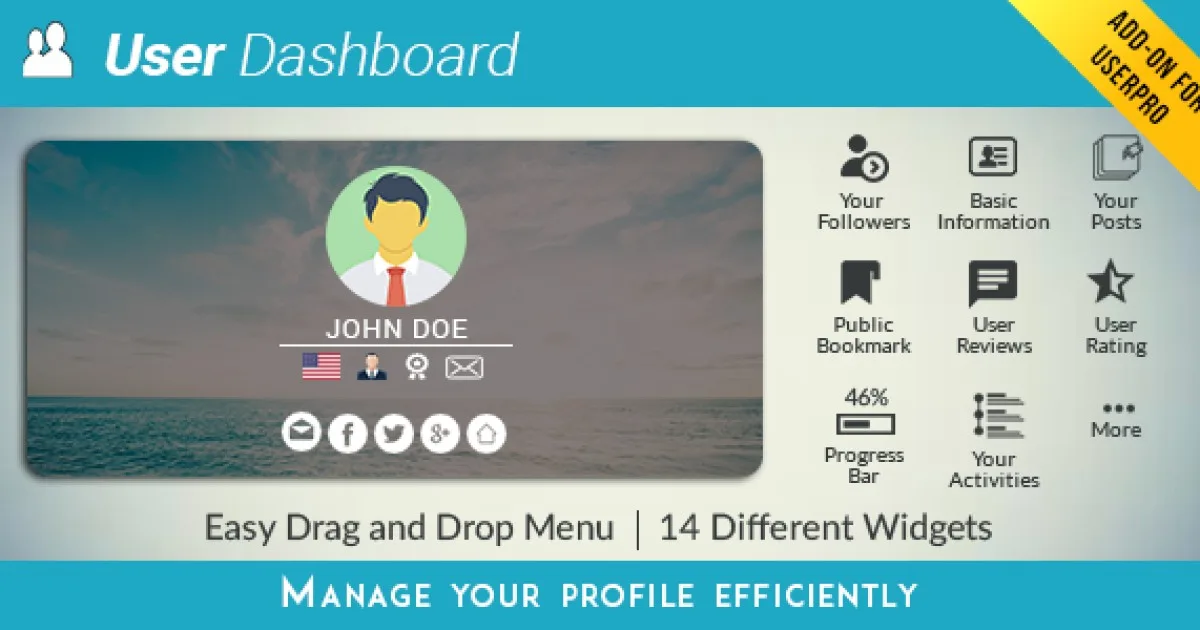
UserPro Dashboard WordPress Plugin builds a frontend member dashboard for UserPro profiles, giving developers centralized account, activity, and profile management control.
- Daily automated updates
- VirusTotal 0/70 clean
- Licensed under GPL
- Secure 256-bit checkout
- Instant direct cloud link
What Is UserPro Dashboard?
UserPro Dashboard is a WordPress plugin add-on, engineered for developers and agencies to extend the UserPro profile ecosystem with a centralized frontend member dashboard. It resolves the bottleneck of forcing members into the wp-admin backend for routine account actions by consolidating profile edits, activity tracking, and account controls into a single front-end view. In production, it operates as a companion module that registers alongside the core UserPro plugin and renders dashboard views through standard WordPress shortcode and template mechanics.
Key Features of the Plugin
The plugin executes by hooking into the WordPress plugin API and the UserPro core, dispatching dashboard rendering through shortcode callbacks that query user meta and assemble output on the front end rather than through admin screens. Data reads and writes traverse WordPress user meta and UserPro’s existing storage layer, so no parallel schema is introduced.
Architectural Highlights
- Frontend Dashboard Shortcode: Registers a dedicated shortcode that renders a member dashboard anywhere a page or post accepts WordPress content, eliminating forced redirection into wp-admin for routine account operations.
- Profile and Account Consolidation: Aggregates profile fields, account settings, and member-specific data into one view, reading from the UserPro field registry so custom fields defined in the core plugin surface automatically.
- Hook-Based Extension Points: Relies on WordPress actions and filters inherited from the UserPro architecture, allowing developers to modify dashboard output without editing plugin source files.
- Template Override Support: Follows the WordPress template override convention, so child themes and custom builds can replace dashboard templates by placing matching files in the theme directory.
- Core Plugin Dependency Handling: Detects the parent UserPro installation at initialization and only registers its modules when the core engine is active, preventing orphaned shortcodes and fatal class collisions.
When building the surrounding site on a modern stack, agencies often pair this module with a flexible base theme; for example, deploying Frameflow supplies Elementor widget architecture and header/footer builders around the dashboard page. For consulting or client-account portals where billing and service pages surround the member area, teams running financial practice sites frequently standardize on Execor to handle the WooCommerce and content layers while the dashboard add-on manages member state.
Who Should Use This Plugin?
This add-on targets WordPress developers and agencies already running the UserPro core plugin on membership, community, or client-portal builds where members need self-service account management. It fits production contexts where administrators want to keep subscribers entirely out of wp-admin, including gated content sites, paid community platforms, and agency client dashboards. It is not intended for sites without the UserPro core installed, since the module carries no standalone profile engine of its own. Non-technical operators seeking a zero-configuration membership system should evaluate the full UserPro stack first, as dashboard templating and field wiring assume familiarity with shortcodes and theme structure.
Compatibility & Runtime Requirements
Baseline runtime constraints follow the standard WordPress plugin execution model, with a hard dependency on the parent UserPro plugin.
| Engineering Metric | Deployment Specification |
|---|---|
| Base Technology / Framework | WordPress plugin architecture (PHP), operating as a UserPro add-on |
| Runtime / Language Requirements | PHP runtime per current WordPress core minimums; standard WordPress server stack |
| Data Exchange / Communication Protocols | WordPress hook/action pipeline and shortcode rendering; server-rendered HTML output |
| Core Dependencies / Engine Compatibility | UserPro core plugin must be installed and active; standard WordPress 5.x/6.x environment |
| Database / Storage Footprint | Uses existing WordPress user meta and UserPro storage; no dedicated custom tables |
How to Install & Deploy the Plugin
Deployment follows the conventional WordPress add-on workflow, requiring the UserPro core to be live before the dashboard module initializes.
- Environment Pre-check: Verify the server meets current WordPress PHP requirements, confirm the UserPro core plugin is installed and activated, and back up the database before adding modules.
- Package Upload: Upload the plugin archive through the WordPress administration Plugins screen, or transfer the extracted folder to wp-content/plugins via FTP/SFTP.
- Direct Activation: Click Activate in the Plugins list; the module registers its shortcodes, dashboard rendering callbacks, and administrative settings immediately, with all features operational once the parent engine is detected.
- Configuration & Testing: Create a page, insert the dashboard shortcode, assign it in the plugin settings as the member dashboard location, and test profile edits, activity display, and account actions as a logged-in test user.
Frequently Asked Questions
Can the dashboard render on any page of my theme?
Yes. Because the dashboard is emitted through a shortcode, it renders on any page, post, or custom post type content area that supports WordPress shortcodes, including builder-based layouts that process shortcodes.
Does this add-on work without the UserPro core plugin?
No. It is a companion module that depends on the UserPro core for user field definitions, profile storage, and rendering callbacks. Without the core active, the dashboard module has no data layer to operate against.
Can I customize the dashboard markup to match my theme?
Yes. The module follows the WordPress template override convention, so copying its template files into a child theme directory lets developers modify markup and styling without touching plugin source.
Does the plugin create its own database tables?
No. All member data writes and reads go through existing WordPress user meta records and the UserPro core storage layer, keeping the database footprint identical to a standard UserPro installation.