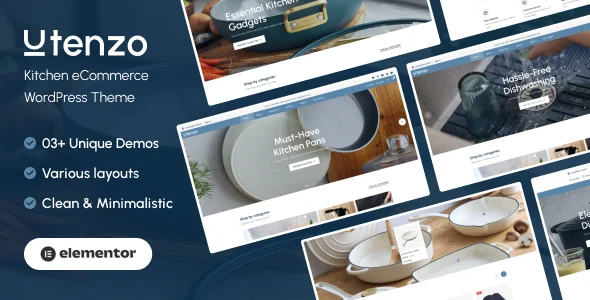
Utenzo – Modern WooCommerce Kitchen Store Theme
Utenzo WooCommerce Kitchen Store Theme is an Elementor-based WordPress theme engineered for cookware and kitchenware shops needing AJAX filtering and fast product grids.
- Daily automated updates
- VirusTotal 0/70 clean
- Licensed under GPL
- Secure 256-bit checkout
- Instant direct cloud link
What Is Utenzo WooCommerce Kitchen Store Theme?
Utenzo WooCommerce Kitchen Store Theme is a WordPress theme built on PHP, Elementor, and WooCommerce, engineered for agencies and store operators launching kitchenware, cookware, and home appliance storefronts. It resolves the bottleneck of assembling bespoke shop templates for niche culinary catalogs by shipping pre-built homepage demos, AJAX product filtering, mega menus, and quick-view modules as a single package. In production, it operates as the presentation layer above WooCommerce 7.x–9.x, with Elementor Pro driving layout, header, footer, form, and popup composition.
Key Features of the Theme
At runtime, the theme hooks into the WordPress template hierarchy and overrides WooCommerce archive and single-product templates with its own PHP view files, while Elementor Pro renders static pages and global header/footer zones from stored widget trees. CSS3 animation classes and minified JS assets are enqueued per template, keeping DOM depth manageable on catalog pages.
Architectural Highlights
- Template hierarchy overrides: Dedicated PHP templates replace native WooCommerce loop and product-detail markup, so shop grids, filters, and quick-view states render without custom coding on each deployment.
- AJAX shop layer: Product filtering requests are dispatched through asynchronous endpoints, updating grid markup client-side and avoiding full-page reloads during category or attribute narrowing.
- One Click Demo Import: A single importer routine seeds homepage demos, page layouts, widgets, and theme options, compressing staging setup into one administrative action.
- Elementor Pro dependency surface: Headers, footers, forms, and popups are constructed with Elementor Pro widgets; teams extending storefront modules for additional WooCommerce widgets can pair the theme with BDThemes Ultimate Store Kit Pro to add grids, wishlists, and checkout widgets inside the same builder.
- Design token system: Unlimited color schemes, 1000+ Google Fonts, and instant-preview Customizer settings resolve into global CSS variables, while a sticky site header persists navigation state across scroll positions.
Who Should Use This Theme?
This package fits WordPress developers and small agencies building category-focused retail sites — kitchen supply shops, cooking-tool retailers, appliance sellers, and multi-category culinary marketplaces. It suits teams already licensed for Elementor Pro who want to compose pages visually rather than hand-code template logic, and operators who need widget-ready sidebars and WooCommerce cart flows out of the box. Developers running parallel commerce builds may also benchmark grid architecture and live theme options against Flatsome | Multi-Purpose Responsive WooCommerce Theme when a project demands a broader multipurpose scope. It is not intended for developers who refuse page-builder output or projects requiring a fully code-driven, headless front end; the demo parity guarantee explicitly depends on Elementor Pro being active.
Compatibility & Runtime Requirements
The baseline constraint is a WordPress installation on PHP with Elementor Pro installed, since several core surfaces of the demo depend on it.
| Engineering Metric | Deployment Specification |
|---|---|
| Base Technology | PHP/WordPress theme (PHP, HTML, CSS, JS files included) |
| WordPress Core | 5.9.x through 6.9.x |
| WooCommerce | 7.x.x, 8.x.x, 9.x.x |
| Builder Engine | Elementor (Elementor Pro required for demo parity) |
| Form Integrations | Contact Form 7, Gravity Forms, WPForms, Ninja Forms |
| Browser Targets | Chrome, Firefox, Safari, Edge |
| Localization | Translation-ready .pot file; WPML-compatible |
| Layout Model | Responsive, 4+ columns, high-resolution assets |
How to Install & Deploy the Theme
Deployment follows the standard WordPress theme lifecycle; once activated, all menus, demo importers, and modules are operational.
- Verify the environment: confirm a supported WordPress version (5.9.x–6.9.x), WooCommerce, Elementor, and Elementor Pro are installed and that PHP memory settings can absorb the demo import routine.
- Upload the package archive through the Appearance administration interface, or extract the PHP, CSS, and JS files into the themes directory of the target site.
- Activate the theme from the admin panel; the parent package initializes immediately, and a bundled child theme is available for controlled override work.
- Run One Click Demo Import to seed pre-built layouts, then configure fonts, color schemes, sticky header behavior, and widgets; validate the shop archive, product quick view, and cross-browser rendering before go-live.
Frequently Asked Questions
Does the theme work without Elementor Pro?
No. The documentation states Elementor Pro is required for the theme to function like the demo, because header, footer, form, and popup modules are built with Elementor Pro widgets.
Is a child theme included for safe customization?
Yes. A child theme ships inside the package, letting developers override templates and enqueue custom assets while preserving the parent codebase across future builds.
Can the catalog be localized for multilingual storefronts?
Yes. The package includes a .pot translation file and is compatible with WPML, enabling translated product archives, menus, and static pages across locales.