Amelia WordPress Plugin
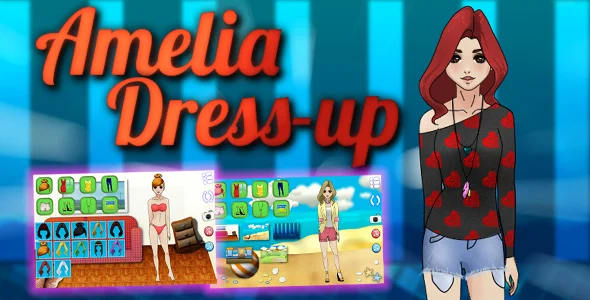
Amelia Dress-Up HTML5 Game: a Construct 2 capx template with ~100 wardrobe items, snapshot mode, and mobile-ready resizable output for web publishers.
- Daily automated updates
- VirusTotal 0/70 clean
- Licensed under GPL
- Secure 256-bit checkout
- Instant direct cloud link
What Is Amelia Dress-Up HTML5 Game?
Amelia Dress-Up HTML5 Game is a Construct 2 game template, engineered for web developers and HTML5 game publishers to deploy a complete dress-up interaction without building the sprite layering logic from scratch. It resolves the bottleneck of authoring category-based wardrobe systems by shipping a pre-wired event sheet covering nearly one hundred clothing and hairstyle items across five selection categories. In production, the package functions as an embeddable browser module that can be re-themed, re-exported, or wrapped for mobile distribution through the included Construct 2 project file.
Key Features of the Game
The engine executes as a Canvas-based runtime: each wardrobe item is drawn as a layered sprite stack, and selection events swap the active sprite per category slot before the compositor renders the final character frame. A snapshot routine then captures the composed stage for fullscreen preview.
Architectural Highlights
- Layered Sprite Wardrobe System: Items are organized into five categories — dresses, tops, shorts, skirts, sweaters, accessories, shoes, and hairstyles — with the event sheet managing one active item per slot to prevent layer conflicts during redraw.
- Construct 2 CAPX Source Project: The included .capx file exposes the full event graph, allowing developers to swap Layered PNG assets, adjust sprite origins, or extend item counts inside the Construct 2 editor before re-export.
- Snapshot Preview Mechanism: A dedicated snapshot button composes the current character state with the selected background and renders it in fullscreen, giving players a shareable final frame without additional plugin code.
- Resizable FWVGA-Ready Layout: The stage scales across viewports down to FWVGA proportions, so the same export serves desktop browsers and mobile Webview containers without separate layout builds.
- High-Resolution Asset Pipeline: All art ships as Layered PNG files, keeping each garment and hairstyle independently editable in external image editors before repacking.
For publishers who need a surrounding site or landing page around the embed, building the shell in an Elementor-driven codebase such as Aigocy Theme keeps the game iframe isolated from heavy theme scripts.
Who Should Use This Game?
This codebase suits freelance HTML5 game developers, portal operators filling casual game categories, and agencies producing branded mini-games for clients who need a playable deliverable fast. It is also practical for teams prototyping touch-based sprite-swap mechanics before committing to a custom engine. It is not intended for developers requiring persistent server-side scoring, multiplayer state, or procedurally generated wardrobe content — the architecture is a self-contained client-side template with no backend runtime defined in its distribution files.
Compatibility & Runtime Requirements
Runtime constraints are defined by the HTML5 export target and the Construct 2 editor version used to open the source project.
| Engineering Metric | Deployment Specification |
|---|---|
| Base Technology | HTML5 export from Construct 2 |
| Source Project Format | Construct 2 CAPX (editable event sheets) |
| Supported Browsers | IE10, IE11, Firefox, Safari, Opera, Chrome, Edge |
| Included Assets | JavaScript JS, HTML, Layered PNG |
| Display Resolution | FWVGA baseline, resizable scaling, high-resolution assets |
| Mobile Readiness | Mobile-ready export suitable for Construct 2 mobile platform builds |
Customization & Workflow Integration
Customization happens entirely inside the Construct 2 editor. Developers open the CAPX, modify the event sheet that binds category buttons to sprite slots, and replace Layered PNG frames to restyle the character or add items to a category. Because all assets are layered rather than flattened, garment swaps do not require redrawing the base character. After edits, the standard Construct 2 HTML5 export regenerates the JS and HTML bundle for deployment, or the mobile platform export path repackages it for native wrappers. If the game lives inside a larger commerce or portal build, isolating it on a dedicated page within an Elementor WooCommerce layout like Sofass Theme keeps third-party theme scripts from competing for the render loop. There is no documented REST, hook, or database extension layer — all extensibility is editor-side.
Frequently Asked Questions
Does the package include editable source art or only compiled output?
Yes, the distribution includes JavaScript JS, HTML, and Layered PNG files, plus the Construct 2 CAPX project. Layered PNGs allow per-item art edits without flattening, and the CAPX exposes the full event logic for modification.
Can the exported game run inside a mobile app Webview wrapper?
Yes, the template is tagged mobile ready and resizable down to FWVGA proportions. The Construct 2 project is included specifically to enable re-exporting for mobile platforms through the editor’s platform export options.
Does gameplay persist choices between sessions?
No persistence mechanism is documented in the distribution files. The documented flow is session-scoped: players dress the character, pick a background, and use the snapshot button to preview the composed result in fullscreen.
How many wardrobe categories and items does the event sheet manage?
Yes, the logic covers nearly one hundred items distributed across five categories, including dresses, tops, shorts, skirts, sweaters, accessories, shoes, and multiple hairstyles, each bound to a dedicated sprite slot in the layered stack.