Bigxon – Parts And Tools WordPress WooCommerce Theme
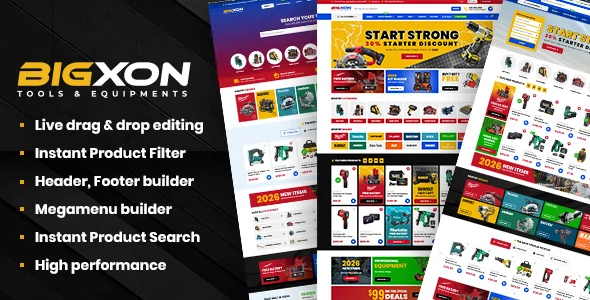
Bigxon is a WooCommerce WordPress theme for auto parts and tools shops, built on Elementor with AJAX filtering and vehicle-fit product lookup.
- Daily automated updates
- VirusTotal 0/70 clean
- Licensed under GPL
- Secure 256-bit checkout
- Instant direct cloud link
What Is Bigxon – Parts And Tools WordPress WooCommerce Theme?
Bigxon – Parts And Tools WordPress WooCommerce Theme is a PHP, HTML, CSS, and JavaScript theme package engineered for WordPress agencies and WooCommerce developers building parts, tools, garage, and equipment storefronts. It resolves a specific commerce bottleneck: automotive and machinery shoppers must verify that a spare part fits a given vehicle before adding it to the cart, a data relationship standard catalog themes do not expose. At release v1.5, it operates as the presentation and shop-interaction layer on top of WooCommerce 5.x through 10.x, with Elementor handling layout composition.
Key Features of the Theme
The codebase overrides the native WooCommerce template hierarchy and dispatches catalog operations through asynchronous endpoints, so filtering, search, and cart mutations update the DOM without full-page reloads. Elementor widgets render each section server-side into standard markup, keeping Gutenberg-optimized page structures intact.
Architectural Highlights
- Compatible Vehicles List: Product pages render a fitment list tying each SKU to specific vehicles, letting buyers confirm applicability directly on the single-product template instead of cross-referencing external fitment charts.
- AJAX Commerce Layer: Product search, cart drawer state, single add-to-cart, quick view, and load-more/infinite-scroll pagination all resolve through background requests, preserving scroll position and reducing round trips on archive pages.
- Header, Footer, and Megamenu Builders: These structures compose in Elementor and inject through theme template parts, with extended container options supporting the 4+ column grid and wide or boxed layout modes.
- Compare, Wishlist, and Frequently Bought Together: Comparison tables and wishlist records persist between sessions — the v1.1.4 changelog documents a fix to wishlist item removal, confirming state is stored and mutated rather than purely ephemeral — while bundled-suggestion queries render attached products on the product page.
- Drag-and-Drop Shop Filters: The multi-layout archive filter is assembled by dragging filter blocks into position, then querying the catalog through the same AJAX pipeline.
Teams maintaining multiple storefront verticals on a shared widget baseline sometimes standardize on a broader engine such as Milano – Multipurpose WooCommerce WordPress Theme, then adopt this package where fitment data is the deciding requirement.
Who Should Use This Theme?
This architecture targets WooCommerce developers and agency build teams delivering auto parts retail, motorcycle and bike part shops, boat and tuning shops, car repair garages, and general tool or equipment stores. It also fits adjacent verticals the author documents — medical, electronics, sneakers, glasses, and supermarket catalogs — because the shop modules are catalog-agnostic. Operators sourcing inventory from external marketplaces can extend the WooCommerce data layer with Amazon Affiliates WooCommerce – WordPress Plugin to import affiliate SKU feeds into the same product schema the theme renders. It is not intended for headless or decoupled front-end projects, since its value depends on the PHP template layer, or for administrators who want zero interaction with a page builder, as Elementor drives the composition workflow.
Compatibility & Runtime Requirements
Baseline runtime constraints are defined by the WordPress core and WooCommerce version matrix below.
| Engineering Metric | Deployment Specification |
|---|---|
| Base Technology | WordPress theme; PHP, HTML, CSS, and JS source files included |
| Runtime Requirements | WordPress 4.9.x through 7.0.x; Gutenberg optimized |
| Commerce Engine | WooCommerce 5.x.x through 10.x.x |
| Builder Compatibility | Elementor, Elementor Pro, Revolution Slider, WP Customizer |
| Plugin Dependencies | Contact Form 7, WPForms, Jetpack, WPML, Polylang, Mailchimp, Dokan |
| Layout & Display | Responsive, 4+ columns, high resolution, widget ready; tested on Firefox, Safari, Opera, Chrome, Edge |
How to Install & Deploy the Theme
Deployment follows the standard WordPress theme initialization sequence, with packed plugins and demo content activated administratively.
- Environment Pre-check: Confirm the server runs a WordPress version inside the 4.9.x–7.0.x matrix and install the target WooCommerce release (5.x–10.x). Verify Elementor availability, since builder widgets depend on it, and check PHP memory settings for demo import headroom.
- Package Upload: Transfer the theme archive through the administration interface under Appearance, or copy the extracted PHP/CSS/JS tree into the themes directory on the server.
- Direct Activation: Activate the theme from the Appearance screen. Administrative menus, custom widgets, and core shop modules initialize immediately and become operational for production use.
- Configuration & Testing: Run the one-click demo import to stage reference layouts, then configure the header/footer builders, megamenu, shop filter layouts, and WP Customizer options. Exercise the AJAX search, cart, quick view, and vehicle-fit list on staged products to validate output before launch.
For catalog sizing comparison during planning, architects often benchmark against Unimart – Multipurpose WooCommerce Theme, which takes a widget-count approach to the same Elementor storefront problem space.
Frequently Asked Questions
Does the theme support multilingual and multi-currency catalogs?
Yes. WPML and Polylang compatibility is documented, enabling translated product data and locale-aware routing, and the feature set explicitly lists multi-currency options for storefronts selling across regions.
Can this theme operate a multi-vendor marketplace?
Yes. Dokan appears in the documented compatible plugin list, so vendor registration, vendor dashboards, and split catalog management run inside the same template layer and AJAX shop modules the theme provides.
What source files ship inside the package?
The package contains PHP files, HTML files, CSS files, and JS files, per the ThemeForest file manifest, and the author documentation is classified as well documented for developer onboarding.