Flacio – Plants Shop WooCommerce WordPress Theme with AI
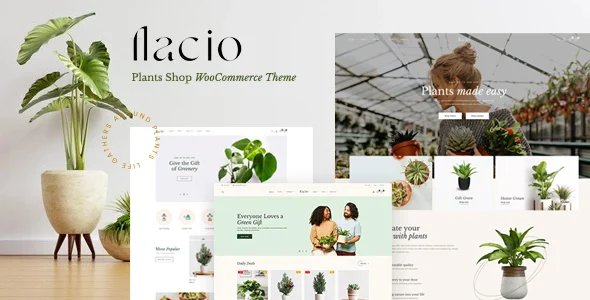
Flacio Plants Shop WooCommerce Theme is an Elementor-driven WordPress theme with AI store management, Ajax filtering, and multi-vendor support for plant retailers.
- Daily automated updates
- VirusTotal 0/70 clean
- Licensed under GPL
- Secure 256-bit checkout
- Instant direct cloud link
What Is Flacio Plants Shop WooCommerce Theme?
Flacio Plants Shop WooCommerce Theme is a WordPress theme built on Elementor and Bootstrap 4, engineered for agencies and store developers deploying plant, flower, and gardening eCommerce storefronts. It resolves the bottleneck of repetitive WooCommerce catalog administration by bundling the Wpbingo AI Commander plugin, which executes natural-language writes against product titles, descriptions, prices, categories, attributes, and stock status. In production, it functions as a single-install storefront engine: demo import populates six homepage layouts, six headers, and six footers, and editors iterate through drag-and-drop widgets rather than template PHP edits.
Key Features of the Theme
The codebase renders pages through the WordPress template hierarchy with WooCommerce template overrides shipping as PHP files, while presentation-layer styles compile from SCSS sources into minified CSS. Client-side interactivity — Ajax add-to-cart, wishlist updates, live search, and shop filtering — dispatches asynchronous requests that refresh product DOM fragments without full-page reloads, reducing perceived latency and CLS during browsing sessions.
Architectural Highlights
- Wpbingo AI Commander Integration: Bundled at no additional cost since v1.3.8, this administrative module accepts natural-language commands and applies batch mutations to WooCommerce product fields. It connects to OpenAI, Claude, Gemini, Groq, and OpenRouter endpoints, so operators select a provider via API credentials rather than being locked to one vendor.
- Ajax Product Filtering and Live Search: Instant search and homepage/shop filters evaluate category, availability, price range, size, and color parameters server-side, then return filtered result sets asynchronously. This avoids query-string reloads on high-SKU plant catalogs.
- Elementor Widget Layer: The package registers 24+ Elementor shortcodes plus widgets for top-selling, featured, and trending product rails. A Mega Menu Builder and Footer Builder expose layout composition without direct template edits.
- Variable Product Swatches: Color, size, and image attribute swatches replace default dropdowns on variable products, with jQuery inner zoom and rollover effects on archive images.
- Multi-Vendor Interoperability: The theme installs cleanly alongside MultiVendorX, Wc Vendor, or Dokan; vendor properties remain managed in each plugin’s own configuration and database tables, not through theme options — an explicit boundary the author documents.
Teams running adjacent verticals can compare this package against Ferrano for fashion catalogs or Zilly for grocery storefronts, since both share the Elementor-plus-Ajax filtering architecture.
Who Should Use This Theme?
This theme targets freelance developers, boutique agencies, and in-house engineers building WooCommerce storefronts for plant shops, garden centers, florists, and landscape businesses that also need portfolio or corporate pages. It fits multi-project agency toolkits: one-click demo import, WPML multilingual support, RTL output, and widget-ready sidebars shorten staging-to-production cycles across client accounts. Operations teams handling large catalogs benefit directly from the AI Commander’s batch-editing path. It is not intended for builders who want Gutenberg-native block editing — the package is explicitly not Gutenberg optimized — or for administrators who expect vendor-management controls to surface inside theme options rather than inside the installed multi-vendor plugin’s own panels. Developers requiring headless decoupling should also look elsewhere, as this is a classic server-rendered WordPress theme.
Compatibility & Runtime Requirements
Baseline deployment requires a standard LAMP stack running a supported WordPress core version with WooCommerce and Elementor active before theme activation.
| Engineering Metric | Deployment Specification |
|---|---|
| Base Technology / Framework | Bootstrap 4.x, Elementor, HTML5/CSS3 (SCSS sources included) |
| Runtime / Language Requirements | PHP-rendered theme files; WordPress 4.9.x through 7.1.x |
| Data Exchange / Communication Protocols | Ajax (add-to-cart, wishlist, search, filters); AI provider APIs (OpenAI, Claude, Gemini, Groq, OpenRouter) |
| Core Dependencies / Engine Compatibility | WooCommerce 5.x–10.x, Elementor and Elementor Pro, WPML, Contact Form 7, Jetpack |
| Database / Storage Footprint | Standard WordPress/WooCommerce schema; vendor data held in MultiVendorX, Wc Vendor, or Dokan tables |
How to Install & Deploy the Theme
- Environment Pre-check: Confirm the server runs a supported WordPress version (4.9.x–7.1.x), install Elementor and WooCommerce, and verify PHP error logs are clean before proceeding.
- Package Upload: Upload the theme archive through the WordPress administration interface under Appearance → Add New, or transfer the extracted PHP, CSS, SCSS, and JS files directly into
wp-content/themes/via SFTP. - Direct Activation: Click Activate. Theme options, the Elementor widget set, header/footer builders, and the bundled AI Commander module become operational immediately.
- Configuration & Testing: Run the one-click demo importer to populate the six homepage layouts and sample data (megamenus import automatically since v1.3.3, with v1.3.0 reducing import duration), then configure AI provider credentials, test Ajax cart and filter behavior, and validate RTL or WPML output if applicable. For broader multipurpose builds outside the gardening vertical, the Bridge theme offers an alternative with 630+ demos.
Frequently Asked Questions
Do multi-vendor plugin settings appear inside the theme options panel?
No. Vendor properties are stored in each plugin’s own database tables, and the plugin developers do not expose that access to the theme, so all vendor configuration happens in MultiVendorX, Wc Vendor, or Dokan admin screens.
Is the AI Commander a separate paid module?
No. The theme bundles Wpbingo AI Commander for WooCommerce at no additional cost. You supply credentials for whichever supported provider — OpenAI, Claude, Gemini, Groq, or OpenRouter — you want executing the product mutations.
Can I build a catalog beyond plants with this codebase?
Yes. The feature set — category-aligned product grids, Ajax filtering, swatches, and vendor support — applies to any WooCommerce catalog. For general merchandise spanning departments, the Unimart multipurpose theme extends the same Elementor-driven approach to 60+ widgets.